

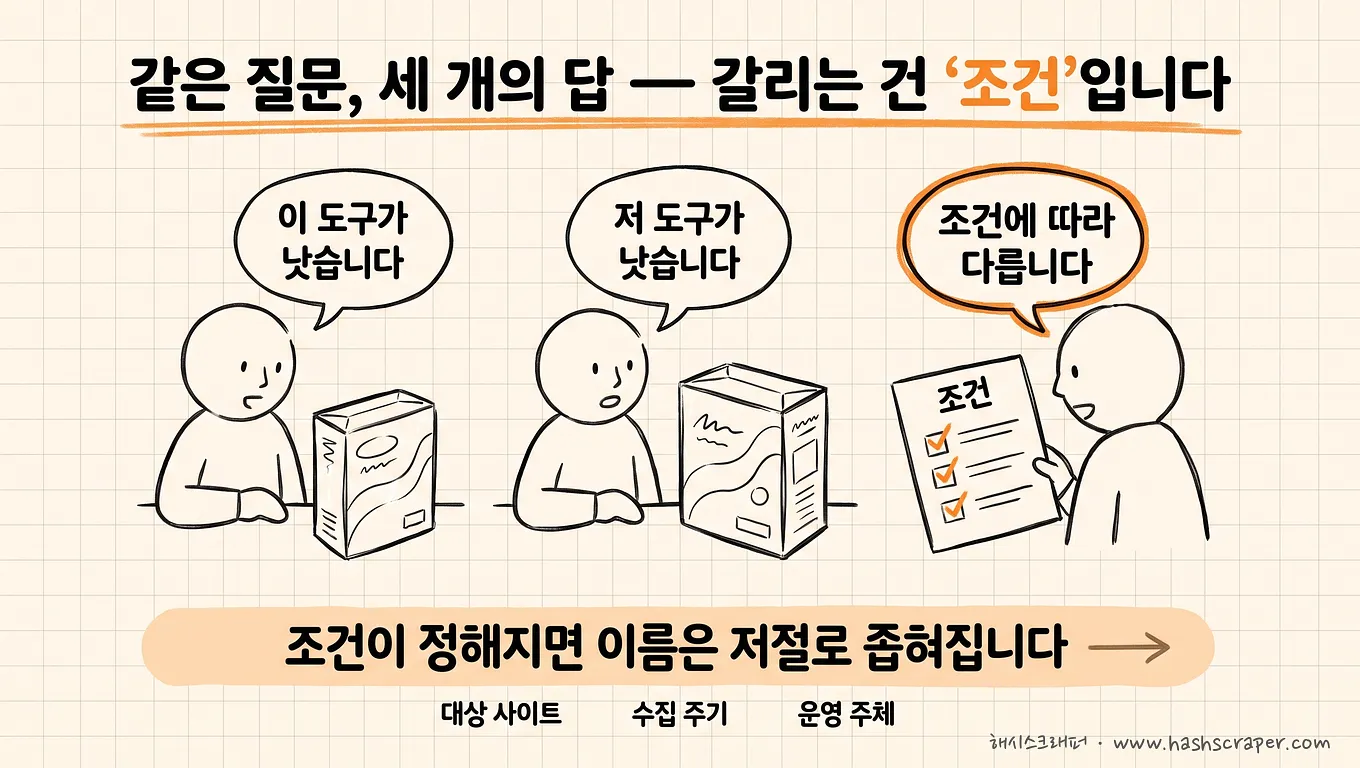
If you ask the same question to three people, you get three answers.
One says Apify, one says Octoparse, and one says, "It depends on the conditions."
The third answer may seem the least thoughtful, but that person is the only one looking at something different.
Experts do not compare products. They compare failure points.
Every data collection tool works well in the first week. The difference only appears on the morning after the site changes.
3-Line Summary (TL;DR)
- There is no single answer to "the SaaS experts recommend most," but once the conditions are defined, the names emerge. For small, one-time screen-level extraction, Thunderbit and Listly; for self-managed recurring collection, Octoparse and Browse AI; for large-scale collection by development teams, Apify, Zyte, and Bright Data; for AI and RAG document collection, Firecrawl; and for ongoing collection where operations are outsourced without development resources, managed services such as Hashscraper.
- The six criteria experts look at are all about failure scenarios — sustainability of block handling / who handles recovery and how quickly / data integrity validation methods / failure alerts and SLAs / contract flexibility / total cost of ownership. Feature comparison tables do not have these six columns.
- Validation matters more than criteria. Ask for evidence, not claims for each of the six criteria. Claims let everyone pass; only evidence filters the candidates.
Table of Contents
- What Is Data Collection Automation SaaS, and Why Recommendations Always Differ
- Experts Do Not Watch Demos
- The Six Things Experts Actually Look At, and How to Validate Them
- Same Criteria, Different Types, Different Answers
- What Cost Efficiency Means — Change the Denominator, and the Ranking Changes
- So, Once the Conditions Are Defined, the Names Emerge
- Have We Only Looked at Sunny Days? A 5-Question Self-Check
- 4 Steps to Validate Today
- Frequently Asked Questions
- Conclusion
What Is Data Collection Automation SaaS, and Why Recommendations Always Differ
Data collection automation SaaS is a cloud service that gathers publicly available information from the web on a set schedule instead of having people do it manually, turning it into table- or API-formatted data. Competitor pricing, products and reviews, job postings, and documents for AI training — this is where most use cases begin.
The reason recommendations differ is simple.
Every person making a recommendation answers with different conditions in mind.
Someone with a development team talks about APIs, while a marketer working alone talks about browser extensions. Both are right. The conditions are simply different.
That is why collecting more and more names does not lead to a decision. A list tells you what exists, but what you need to make a decision is what breaks.
If you need the candidate list itself, it is organized in Comparison of 9 Data Crawling SaaS Products Most Commonly Used by Companies. This article covers the criteria for choosing from that list.
Experts Do Not Watch Demos
Demos always succeed.
An easy site, a pre-checked page, the first day when nothing has gone wrong. Under those conditions, any tool works well.
That is why demos cannot filter candidates. They let everyone pass.
What experts ask for is exactly the opposite.
"Instead of the easiest site, please run it once right now on the hardest site."
With that one sentence, half the candidates disappear.
A collection tool's capability does not reveal itself on sunny days. It only reveals itself on bad days — the day a site is redesigned, the day blocks appear, the day collection volume drops by half.
And all six criteria discussed below are, without exception, bad-day criteria.
One point should be clarified in advance. The "experts" in this article are not specific individuals or survey results. They are the common questions asked by people who have operated data collection for a long time, organized alongside the questions Hashscraper has repeatedly received while operating collection for more than 500 companies.
The Six Things Experts Actually Look At, and How to Validate Them
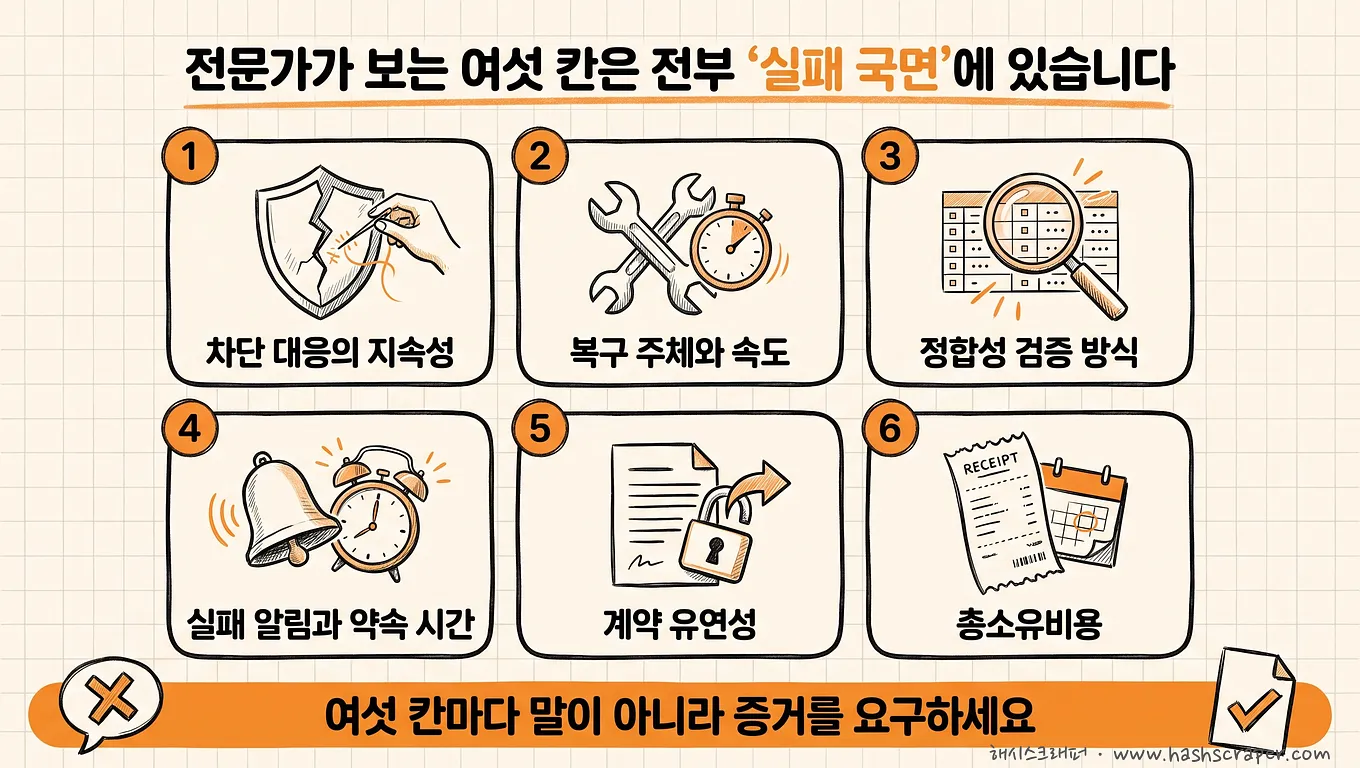
Knowing the criteria is only half the work. The other half is how you verify those criteria.
Questions receive answers; validation receives evidence.
| # | Criteria Experts Look At | What Beginners Ask | What Experts Ask | Evidence You Should Receive |
|---|---|---|---|---|
| 1 | Sustainability of block handling | "Can you collect data from this site?" | "How has the failure rate on this site changed over the past few months?" | Actual collection samples from the target site + success rates over time. Whether proxy and CAPTCHA handling are included by default or offered as options |
| 2 | Recovery owner and speed when a site changes | "Do you provide maintenance?" | "Who fixes it, within how many days, how many times, and at what cost?" | Response times and free support scope stated in the contract or terms |
| 3 | Data integrity validation method | "What is your accuracy percentage?" | "What is the denominator for that number, who measured it, and when?" | 100 original sample records + criteria for duplicates, missing data, and formatting |
| 4 | Who learns about failures first | "Does it run reliably?" | "On a day when collection returns zero records, who finds out within how many hours?" | Alert configuration screen, compensation or service-extension terms for incidents |
| 5 | Contract flexibility and exit options | "How much does it cost?" | "Can we stop after one month? What can we take with us then?" | Monthly contract and penalty clauses, conditions for exporting data and item definitions |
| 6 | Total cost of ownership (TCO) | "What is the monthly fee?" | "How many hours of our team's time will one year of operation require?" | One month of actual logs — time truly spent creating and repairing rules |
1. Block handling is not about whether it succeeds, but whether it remains sustainable. Most tools can get through once. The difference is whether they can deliver the same success rate next month. Hashscraper has collected from more than 5,000 domestic sites using proxies across 195 countries, and the validation method is always the same — test the hardest site first.
2. "We provide maintenance" is not information. The answer is complete only when all four are specified: who, within how many days, how many times, and at what price. If even one is blank, that space will later be filled with an invoice or an operational gap. The process of failure at this point is organized in 5 Reasons Why Web Scraping Projects Fail.
3. An accuracy number becomes meaningful only when you ask for the denominator. Collection volume does not prove quality. The count can increase even when the same product appears three times and price columns contain mixed formats. Even for Hashscraper's benchmark of 99.7% data accuracy, we recommend opening and reviewing 100 samples yourself.
4. Good alerts arrive before people do. If you discover empty data in Monday's report, that is effectively the same as having no alert. The question is not "Do you have alerts?" but "Who finds out first?"
5. Contract flexibility is not a pricing term; it is an exit route. Can you stop after one month, and can you take your collection targets and item definitions with you when you do? If you miss the second question, you may be able to change tools, but you will still have to rebuild the definitions from scratch.
6. Fees appear on invoices, and all other costs appear on people's calendars. The sixth category is the one most often omitted entirely.
Same Criteria, Different Types, Different Answers
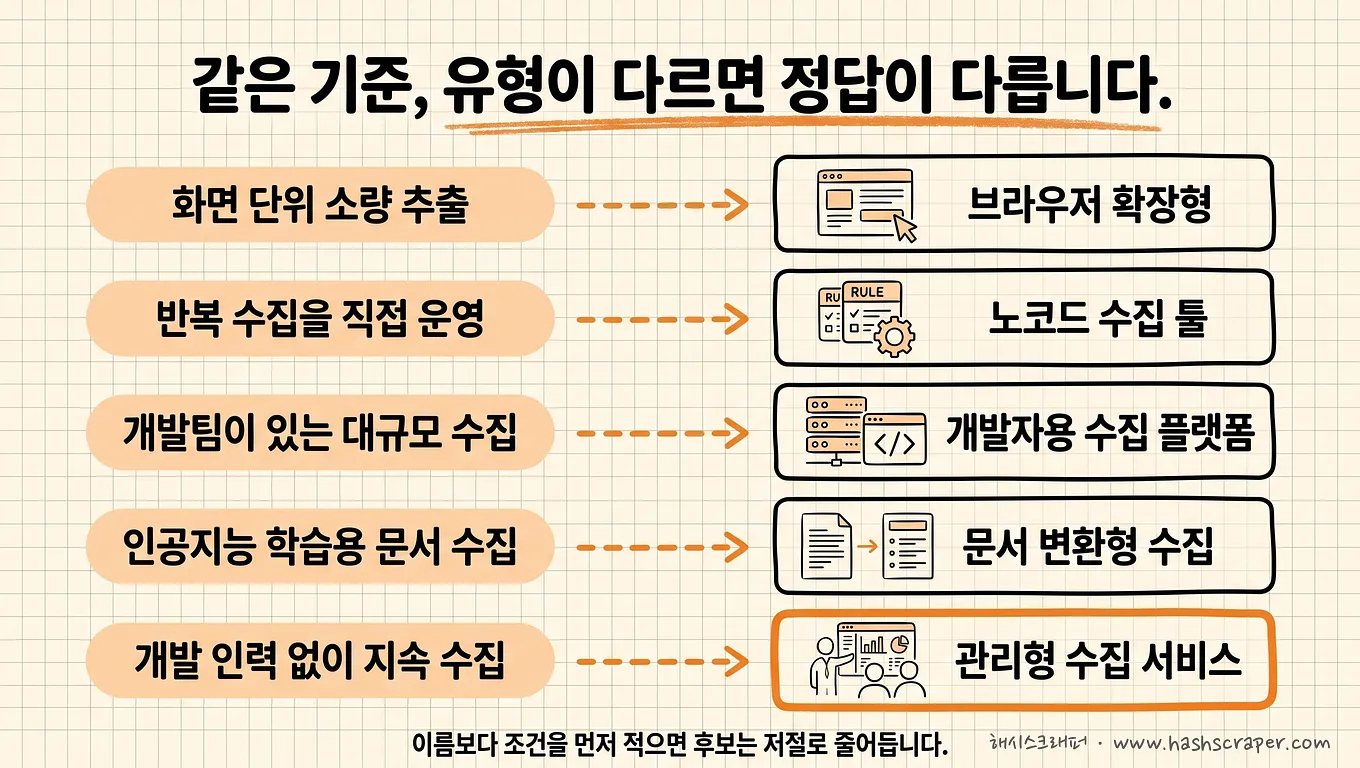
The six criteria apply equally to every type, but the passing thresholds differ by type.
It is unreasonable to demand a contractual SLA from a no-code tool. But if it says "I am the person who fixes it" in that space, that is not a flaw — it is a specification.
| Criteria | No-Code Tools (Thunderbit, Octoparse, Browse AI, Listly) | Developer APIs and Collection Infrastructure (Apify, Zyte, Bright Data, Firecrawl) | Managed Collection Services (Hashscraper) |
|---|---|---|---|
| Sustainability of block handling | Within the default offering; limited on heavily protected sites | Proxy and browser infrastructure are strengths; outcomes depend on the user's implementation | Provider responds continuously (proxies across 195 countries) |
| Recovery owner and speed | User | Your development team | Provider (included in subscription) |
| Integrity validation | User checks manually | Team directly implements validation logic | Provider inspects data before delivery (99.7% accuracy benchmark) |
| Failure alerts and SLA | Tool-provided alert level | Built in-house | Response time specified in contract |
| Contract flexibility | Easy monthly subscription and cancellation (strength) | Usage-based billing makes it easy to get started (strength) | Monthly subscription |
| Total cost of ownership | Low fees, but high human time cost | Fees + developer time | Development and maintenance included in flat monthly fee (cases of 68% annual savings compared with individual outsourcing) |
The pivotal row in the table is the second one: recovery owner. The other five rows are mostly consequences of that one.
What Cost Efficiency Means — Change the Denominator, and the Ranking Changes
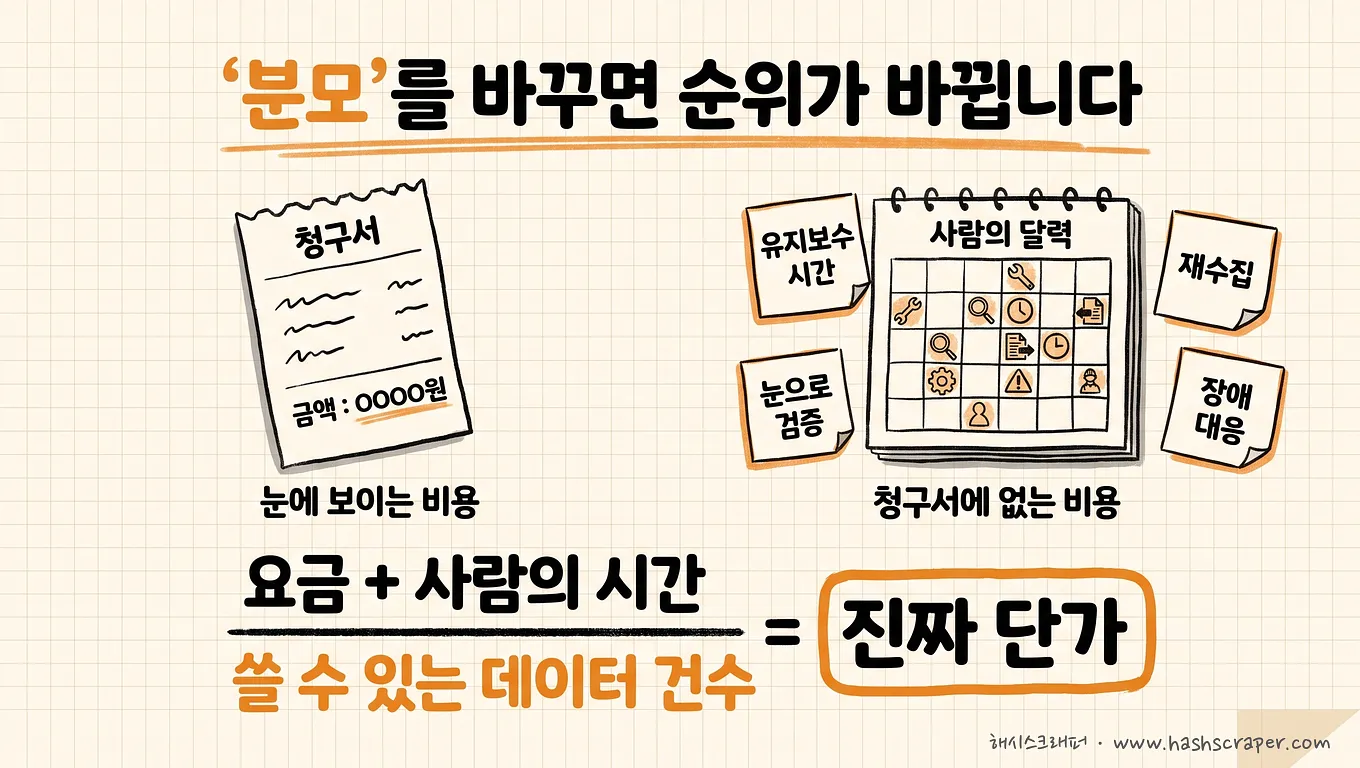
When asking which tool offers the best cost efficiency, most people compare only the numerator: the monthly fee.
Cost efficiency is not the monthly fee; it is the total cost required to obtain one unit of data that can actually be used.
That is why you need to redefine two parts.
What must be included in the numerator (cost)
- Tool fees
- The time people spend creating and repairing rules
- Rework caused by incorrect data
- Gaps during periods when collection stops — collecting past dates retroactively is difficult
What must be included in the denominator (outcome)
- Not collected record count, but the number of records that pass inspection and are actually used for analysis
When you change the denominator this way, the ranking often reverses. If 100,000 records are only half usable, the denominator is close to zero, so no matter how low the fee is, the efficiency does not materialize.
If you want to enter your own numbers and calculate it directly, the calculation framework is organized in Subscription-Based Crawling vs. Individual Billing — A One-Year Total Cost of Ownership (TCO) Comparison.
Fees appear on invoices, and all other costs appear on people's calendars.
So, Once the Conditions Are Defined, the Names Emerge
We will not avoid the question. Once the conditions are defined, the answer narrows down like this.
| Condition | Type | Services Commonly Mentioned |
|---|---|---|
| A small amount, once, from a screen that is open right now | Browser extension and AI extraction | Thunderbit, Listly, Web Scraper |
| I manage it myself, recurring weekly collection, a few sites | No-code SaaS | Octoparse, Browse AI |
| Development team available, large-scale and always-on collection | Developer APIs and collection infrastructure | Apify, Zyte, Bright Data |
| Web documents as text for AI and RAG | LLM-oriented collection API | Firecrawl |
| Outsource operations without development resources; work cannot be interrupted | Managed collection service | Hashscraper |
The strengths of each category are clear.
Thunderbit has the shortest time to first result because its AI reads the page and suggests items to extract. Octoparse has robust templates and scheduling, making it close to the standard for self-managed recurring collection, while Listly is the browser extension most familiar to domestic users. Apify's strengths are its execution environment and actor ecosystem; Bright Data's is the scale of its proxy infrastructure; and Zyte's is its lineage as the team that maintains the open-source Scrapy. Firecrawl specializes in converting web documents into formats that LLMs can use immediately.
A managed collection service is a subscription service in which the provider operates crawler development, block handling, maintenance after site changes, and monitoring instead of merely lending you a tool, while the company receives only the resulting data. Hashscraper belongs to this category, and it is also the only category where criterion No. 2, recovery owner, is filled in as "provider."
In summary:
What experts recommend is not a product, but a condition. The moment the conditions are defined, the names naturally narrow down.
Since detailed pricing and features change frequently, we recommend checking each service's official site for final confirmation.
Have We Only Looked at Sunny Days? A 5-Question Self-Check
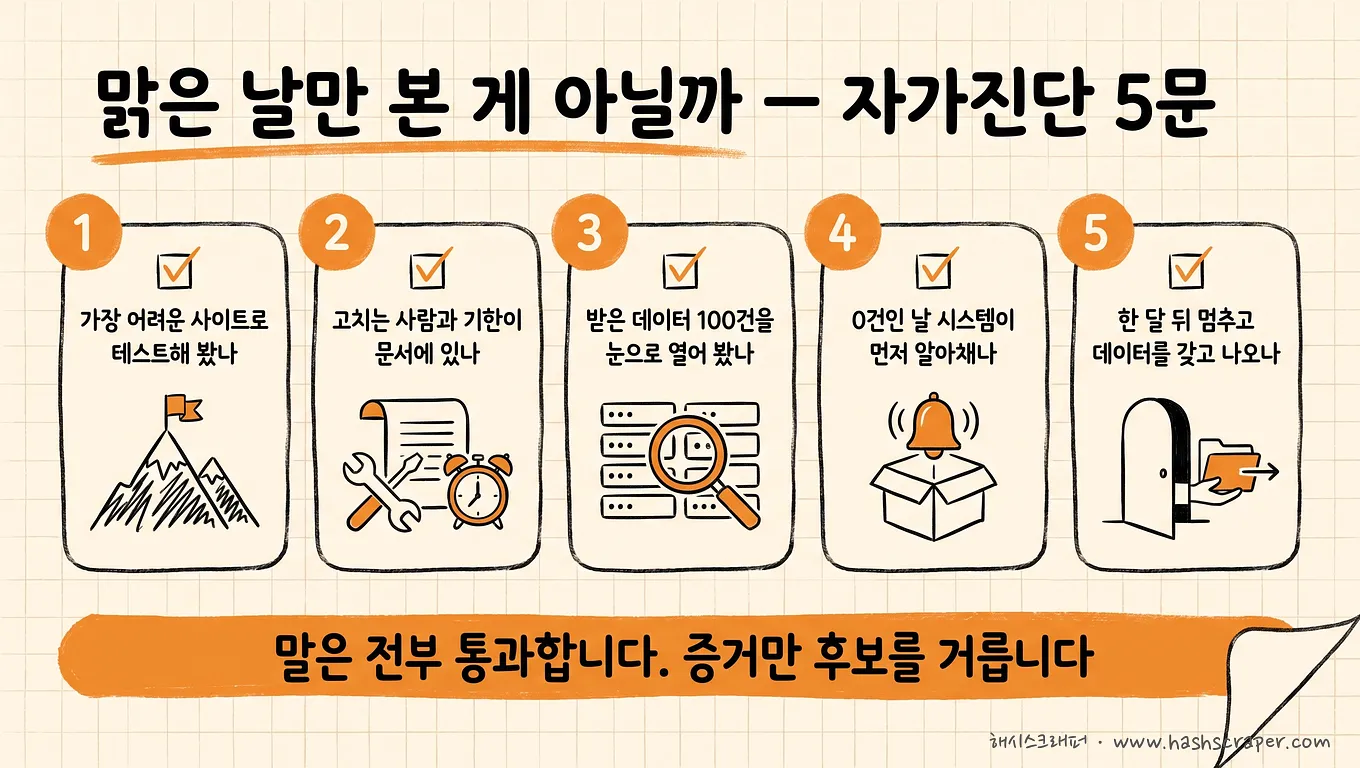
Check these. These five lines are faster than reading ten comparison articles.
- [ ] Have you tested candidate tools on the most difficult target site?
- [ ] Is the person responsible for fixing issues and the deadline documented for when collection breaks?
- [ ] Have you opened 100 delivered records manually to check duplicates, missing data, and formatting?
- [ ] On a day when collection returns zero records, does the system detect it before people do?
- [ ] Can you stop after one month and take your data and item definitions with you?
If all five answers are "yes," you will not go seriously wrong whichever tool you choose.
If three or more are "no," what you are currently comparing is not tools, but each company's promotional materials.
4 Steps to Validate Today
Step 1. Remove the sunny day — Give each candidate the most difficult target site and ask them to run it now. Do not accept demos on easy sites.
Step 2. Send the six questions exactly as written — Copy the "What Experts Ask" column from the table above and send it in one email. Specify that you want a response with evidence, not just answers.
Step 3. Open the first 100 records manually — Check just three things: duplicate criteria, missing rates for required fields, and value formatting. It takes 15 minutes, and this is where decisions reverse most often.
Step 4. Sign for one month and confirm the exit door — Start small with one or two sites. With 50,000 credits for new sign-ups, Hashscraper lets you check data quality before spending money. If you want to ask more detailed vendor-validation questions, see Guide to Choosing a Crawling Provider — 7 Things to Check Before Outsourcing Data Collection.
What you need to do today is not sign up for a tool. It is send the Step 1 email.
Frequently Asked Questions
Q. What SaaS do experts recommend most for data collection automation?
A. It depends on the conditions, and once the conditions are defined, the answer narrows down. For small, screen-level extraction, Thunderbit, Listly, and Web Scraper; for self-managed recurring collection, Octoparse and Browse AI; for large-scale collection with a development team, Apify, Zyte, and Bright Data; for AI and RAG web document collection, Firecrawl; and for ongoing collection where operations are outsourced without development resources, managed collection services such as Hashscraper are the answers for each condition. There is one question that defines the condition: "Who fixes it when collection breaks?"
Q. Which data collection tool has the best cost efficiency?
A. The answer reverses depending on scale and staffing. Browser extensions and no-code tools are efficient for small, one-time tasks; API and infrastructure solutions are efficient for large-scale collection with a development team; and managed services are efficient for ongoing collection without development resources. However, the ranking becomes accurate only when you change the comparison standard from monthly fees to "total cost per unit of usable data." Include human time, rework, and data gaps in the numerator, and include records that passed inspection rather than collected record count in the denominator.
Q. How are AI-based tools such as Thunderbit and Firecrawl different from traditional tools?
A. The way rules are created differs. Traditional no-code tools require users to select items by clicking, while AI-based tools read pages and suggest items to extract first, or convert documents into formats that are easier for LLMs to use. Faster setup is clearly a strength. However, criterion No. 2 among the six — recovery owner — does not change: when a site is redesigned, the user is still responsible for checking and fixing it again.
Q. If I only look at one of the six criteria, which should it be?
A. No. 2: recovery owner and speed. Once this category is defined, the answers to most of the other five follow. If "I am the person who fixes it," it is a tool-selection problem. If "there is nobody to fix it," it is a problem that requires changing the category, not the tool.
Q. Is a candidate disqualified if it cannot answer these questions?
A. Not being able to answer and not being able to provide evidence are different things. Depending on the type, some categories may not apply in the first place — for example, it is not appropriate to demand a contractual response time from a no-code tool. There is one standard for judgment: does it answer the categories applicable to its type with numbers and documents? Eliminate only candidates that evade questions about categories that do apply to them.
Conclusion
For the question, "What SaaS do experts recommend most?" the answer is not a name, but an order of operations.
- Define the conditions — who uses it, how often, and who fixes it when it breaks
- Filter candidates through the six categories — block sustainability, recovery owner, integrity, alerts, contract, and total cost
- Receive evidence, not claims — difficult-site samples, contract wording, and 100 data records
Then the names will be reduced to two or three. That is when you choose.
Feature comparison tables were written for sunny days. Most days when you need data are bad days.
Do not watch sunny-day demos. Look at bad-day records.
Get Started Now
Tell us the sites and items you want to collect, and we will assess for free whether no-code tools are sufficient or whether you need the scale of a managed service. You can start by giving us your most difficult site — that is the order we recommend as well.


