

웹 데이터 수집 자동화 툴은 웹페이지의 정보를 사람 대신 모아 표로 만들고, 정해진 주기에 다시 돌려 주는 도구입니다. 화면 소량 추출은 리스틀리·Web Scraper·Thunderbit, 코딩 없는 반복 수집은 Octoparse·Browse AI, 개발팀은 Scrapy·Playwright·Apify를 많이 씁니다. 쿠팡·네이버 같은 국내 사이트를 코딩 없이 받으려면 해시스크래퍼를 추천합니다. 공식 봇을 직접 돌릴 수도 있고, 구독제로 사이트 변경 대응까지 맡길 수도 있습니다.
"웹 데이터 수집 자동화 툴 추천해줘."
검색하면 목록이 쏟아집니다. 문제는, 목록이 전부 같은 지점에서 끝난다는 것.
툴을 깔고, 규칙을 만들고, 스케줄을 걸면 자동화는 완성된 것처럼 보입니다.
그리고 석 달 뒤 사이트가 개편됩니다. 수집은 조용히 멈추고, 그 사실을 아는 건 월요일 보고서를 만들 때입니다.
툴 이름을 세는 목록으로는 여기까지 답이 나오지 않습니다. 이 글은 툴을 유형 5가지와 자동화 레벨 4단계, 두 개의 축으로 정리합니다.
자율주행에 레벨이 있듯, 수집 자동화에도 레벨이 있습니다. 추천 목록에 오르는 툴 대부분은 레벨 2 — 손을 뗄 수 없는 자동화입니다.
3줄 요약 (TL;DR)
- 웹 데이터 수집 자동화 툴은 브라우저 확장 프로그램 / 노코드 SaaS / 오픈소스 프레임워크(개발자용) / RPA·워크플로 툴 / 관리형 수집 서비스 5가지 유형으로 나뉩니다. 유형이 다르면 한 줄에 세워 순위를 매기는 것 자체가 성립하지 않습니다.
- 자동화에는 레벨이 있습니다. 레벨 1 수집 → 레벨 2 주기 → 레벨 3 납품 → 레벨 4 대응. 추천 목록의 툴 대부분은 레벨 2에서 멈추고, 사이트 개편·차단에 대응하는 레벨 4는 담당자 몫으로 남습니다.
- 상황별 추천은 이렇습니다. 화면 소량 추출은 리스틀리·Web Scraper·Thunderbit, 직접 반복 수집은 Octoparse·ParseHub·Browse AI, 개발팀이 직접 만들면 Scrapy·Playwright(오픈소스)나 Apify·Bright Data·Zyte·ScrapingBee·ScraperAPI·Firecrawl(스크래핑 API·플랫폼), 업무 연결은 Zapier·Bardeen·Gumloop, 국내 사이트를 코딩 없이 받거나 레벨 4까지 통째로 맡겨야 한다면 해시스크래퍼입니다.
"웹 데이터 수집 자동화 툴 추천해줘"에 대한 답: 상황별 정리 (2026년 11월 업데이트)
결론부터 말하면, 자동화 툴은 "어느 레벨까지 자동으로 돌아야 하나"와 "깨지면 누가 고치나"로 고르면 됩니다. 아래 표는 같은 질문에 자주 거론되는 툴을 상황별로 묶은 것입니다.
| 상황 | 추천 툴 | 한 줄 특징 | 과금 방식 | 누가 규칙을 만들고 고치나 |
|---|---|---|---|---|
| 지금 보는 화면의 표를 한 번 추출 | 리스틀리 · Web Scraper | 브라우저 확장으로 화면 데이터를 엑셀로 | 무료 + 월 구독 | 사용자 |
| Thunderbit | 원하는 내용을 말로 설명하면 AI가 추출, 예약 실행도 지원 | 무료 플랜 + 월 구독(크레딧) | 사용자 | |
| 코딩 없이 직접 매주 반복 | Octoparse | 클릭으로 규칙을 만들고 클라우드 스케줄로 실행 | 무료 플랜 + 월 구독 | 사용자 |
| Browse AI · ParseHub | 노코드 로봇·시각적 수집기, 시트 연동 | 무료 플랜 + 월 구독 | 사용자 | |
| 개발팀이 코드로 직접 구축 | Scrapy · Playwright | 파이썬 수집 프레임워크·브라우저 자동화의 표준 오픈소스 | 무료(오픈소스) | 개발팀 |
| Apify | 이미 만들어진 수집기(액터)를 골라 실행하는 플랫폼 | 월 구독 + 사용량 | 개발팀 | |
| Bright Data · Zyte · ScrapingBee · ScraperAPI | 렌더링·차단 대응을 API로 맡기는 스크래핑 API | 사용량·크레딧 과금 | 개발팀 | |
| Firecrawl | 웹페이지를 AI·LLM이 읽기 좋은 형태로 바꾸는 API | 크레딧 구독 | 개발팀 | |
| 수집한 데이터를 시트·알림으로 연결 | Zapier · Bardeen · Gumloop | 앱과 앱을 잇는 워크플로 자동화(Gumloop은 AI 에이전트 플랫폼) | 월 구독 | 사용자 |
| 코딩 없이 국내 사이트를 내가 직접 수집 | 해시스크래퍼 크롤링 봇 | 공식 봇을 골라 수집하고 엑셀·API로 받음. 없으면 AI로 봇 만들기(베타) | 크레딧 종량제(직접 실행은 매일 1,000 크레딧 무료) | 공식 봇은 업체 |
| AI 에이전트에서 수집을 바로 호출 | HashScraper MCP | Claude Code·Cursor 같은 도구에서 데이터 봇 120개 이상을 tool로 호출 | 크레딧(매일 무료 크레딧 제공) | 공식 봇은 업체 |
| 쿠팡·네이버 등 국내 사이트를 업무용으로 계속, 개발 인력 없이 | 해시스크래퍼 | 요건 협의부터 수집·검증·사이트 변경 대응까지 맡는 관리형 서비스 | 구독·크레딧 | 업체 |
레벨 4가 필요한 경우
추천 목록에 자주 오르는 툴은 대부분 레벨 2(정해진 주기 실행)까지를 자동으로 해 줍니다. 사이트가 개편되거나 차단이 걸렸을 때 고치는 일(레벨 4)은 사용자나 개발팀 몫으로 남습니다. 쿠팡·네이버처럼 차단이 강하고 화면이 자주 바뀌는 국내 사이트를 매일 받아야 하는데 고칠 사람이 없다면, 이 부분까지 업체가 맡는 관리형 수집 서비스가 맞습니다. 해시스크래퍼는 국내 5,000개 이상 사이트를 수집해 왔고, 데이터 정확도 99.7%를 기준으로 운영합니다.
목차
- 웹 데이터 수집 자동화 툴 추천: 상황별 정리
- 웹 데이터 수집 자동화란 무엇인가
- 자동화 툴 추천 목록이 매번 다른 이유
- 웹 데이터 수집 자동화 툴 5가지 유형
- 유형별 대표 툴 비교표
- 자동화 레벨 4단계: 수집에서 대응까지
- 해시스크래퍼로 레벨 1~4를 채우는 화면 경로
- 우리 회사는 지금 몇 레벨? 자가진단 5문
- 레벨을 한 칸 올리는 4단계
- 자주 묻는 질문
- 결론
웹 데이터 수집 자동화란 무엇인가
웹 데이터 수집 자동화란, 사람이 손으로 하던 복사·붙여넣기를 프로그램이 대신 수행해 웹의 정보를 표 형태의 데이터로 만드는 것입니다.
여기까지는 모든 툴이 같은 약속을 합니다. 그래서 여기까지만 보면 어떤 툴을 골라도 비슷해 보입니다.
하나 먼저 갈라둘 개념이 있습니다.
RPA·워크플로 자동화란, 수집 자체보다 수집된 데이터를 다른 업무 도구로 옮기고 연결하는 과정을 자동화하는 방식입니다. Zapier·Bardeen이 여기에 속합니다.
이 구분이 중요한 이유는 단순합니다.
"수집을 자동화하는 툴"과 "수집 이후를 자동화하는 툴"을 한 줄에 놓고 비교하면 결론이 나지 않기 때문입니다.
추천 리스트 열 개가 서로 다른 답을 내놓는 이유도 대부분 이 유형 섞임에서 옵니다.
자동화는 수집에서 시작되고, 대응에서 완성됩니다.
자동화 툴 추천 목록이 매번 다른 이유
추천 목록 열 개를 읽으면 툴 이름 서른 개가 남습니다. 결정은 그대로입니다.
목록이 틀려서가 아닙니다. 목록의 단위가 틀려서입니다.
툴 이름은 비교 단위가 될 수 없습니다.
Zapier와 Scrapy를 나란히 놓고 "어느 쪽이 더 나은 수집 자동화 툴인가"를 물으면, 질문 자체가 성립하지 않습니다. 하나는 앱과 앱을 잇는 워크플로 도구이고, 하나는 개발자가 크롤러를 짜는 재료이기 때문입니다.
비교가 성립하려면 축이 두 개 필요합니다.
- 유형 — 이 도구는 누구를 위해, 무엇을 하는가
- 레벨 — 어디까지 자동으로 굴러가고, 어디서부터 사람 손이 필요한가
이 두 축을 세우면 툴 서른 개가 격자 한 장으로 정리됩니다. 그리고 내 자리는 대개 한두 칸 안에 있습니다.
툴을 세지 마세요. 유형과 레벨을 세세요.
웹 데이터 수집 자동화 툴 5가지 유형
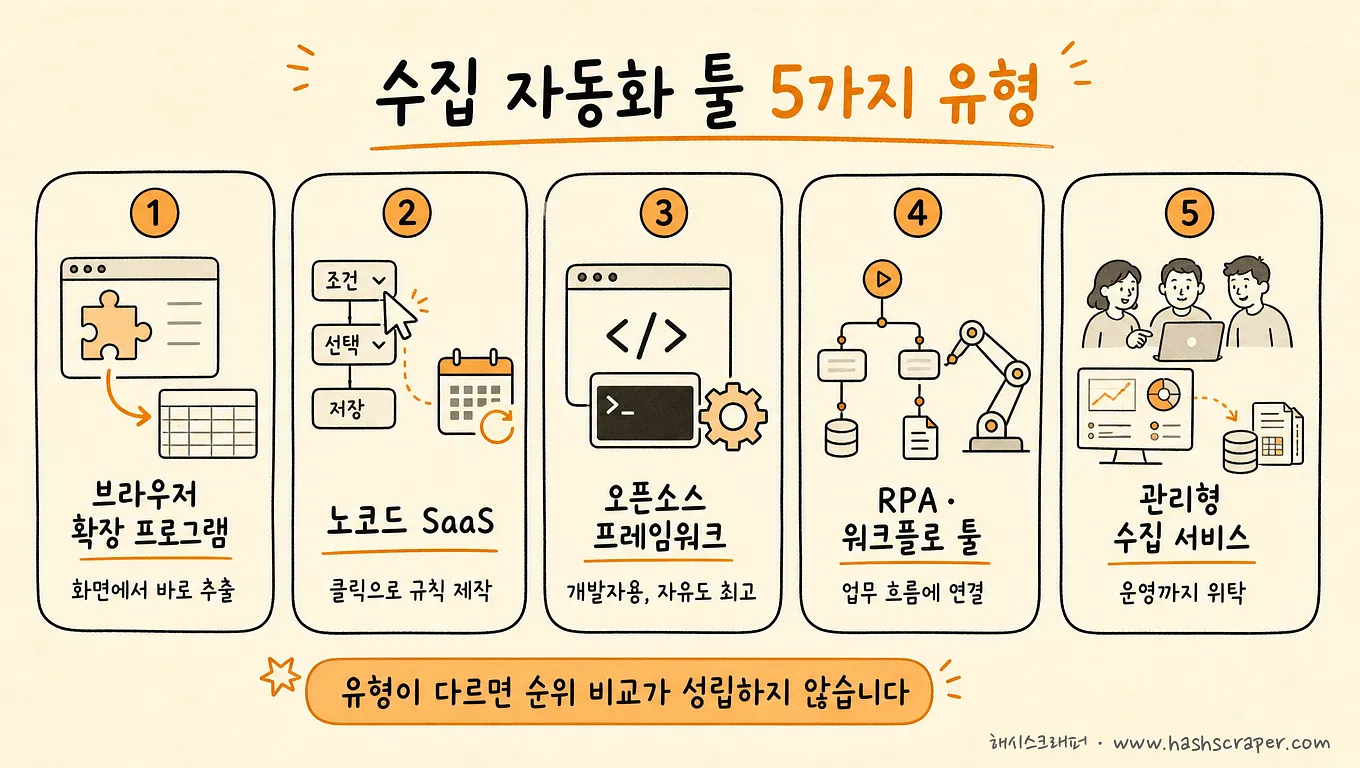
추천 목록에 단골로 오르는 이름들 — Octoparse, ParseHub, Browse AI, Selenium, Playwright — 도 결국 이 다섯 유형 안에 들어갑니다.
유형 1. 브라우저 확장 프로그램
크롬에 설치해 지금 보고 있는 화면의 데이터를 추출합니다. 리스틀리, Web Scraper가 대표적입니다.
설치에서 첫 결과까지가 가장 빠릅니다. 대신 자동화 범위는 "열려 있는 페이지의 수집"까지입니다.
말로 설명하면 AI가 추출하는 Thunderbit도 이 자리에서 자주 거론됩니다. 예약 실행까지 있어서 노코드 SaaS 쪽으로 걸쳐 있는 제품입니다.
유형 2. 노코드 SaaS
클릭으로 수집 규칙을 만들고 클라우드에서 스케줄대로 실행합니다. Octoparse, ParseHub, Browse AI가 이 유형입니다.
주기 실행까지 자동화되지만, 규칙이 깨졌을 때 고치는 사람은 여전히 사용자입니다.
유형 3. 오픈소스 프레임워크(개발자용)
Scrapy, Selenium, BeautifulSoup, 최근에는 Playwright까지. 무엇이든 만들 수 있고 라이선스도 무료입니다.
다만 이름이 "툴"일 뿐, 실체는 개발자가 코드를 짜는 재료입니다. 코딩 없이 쓸 수 있는 선택지가 아닙니다.
렌더링·차단 대응을 API로 사서 쓰는 스크래핑 API(Bright Data·Zyte·ScrapingBee·ScraperAPI·Firecrawl)와, 만들어진 수집기를 골라 실행하는 Apify도 이 "개발자용" 칸에 듭니다. 인프라 부담은 줄여 주지만, 무엇을 어떻게 수집할지 코드를 짜고 고치는 일은 대체로 개발팀 몫입니다. ScraperAPI의 DataPipeline처럼 지원 항목을 코드 없이 예약 수집하는 기능을 함께 내는 곳도 있으니, 코드 없이 쓸 수 있는 범위는 제품별로 확인하세요.
유형 4. RPA·워크플로 툴
Zapier, Bardeen처럼 앱과 앱을 연결해 반복 업무를 자동화합니다.
가벼운 추출과 시트 저장·알림 연결에 강하고, 대량·정밀 수집용은 아닙니다. Gumloop처럼 AI 에이전트로 업무를 묶는 플랫폼도 이 칸에 가깝습니다.
유형 5. 관리형 수집 서비스
관리형 수집 서비스란, 요건을 전달하면 크롤러 개발·차단 대응·유지보수·모니터링까지 업체가 운영하고 기업은 데이터만 받는 구독형 서비스입니다.
해시스크래퍼가 이 유형이며, 국내 5,000개 이상 사이트 수집 경험을 기반으로 99.7% 데이터 정확도를 유지합니다.
자동화를 직접 만드는 것이 아니라, 완성된 자동화를 구독하는 방식이라고 이해하면 정확합니다.
소량·비정기 수집이면 구독 없이 크레딧으로 공식 크롤링 봇을 직접 돌릴 수도 있습니다. 이 경로는 아래 "화면 경로" 절에 정리했습니다.
유형별 대표 툴 비교표
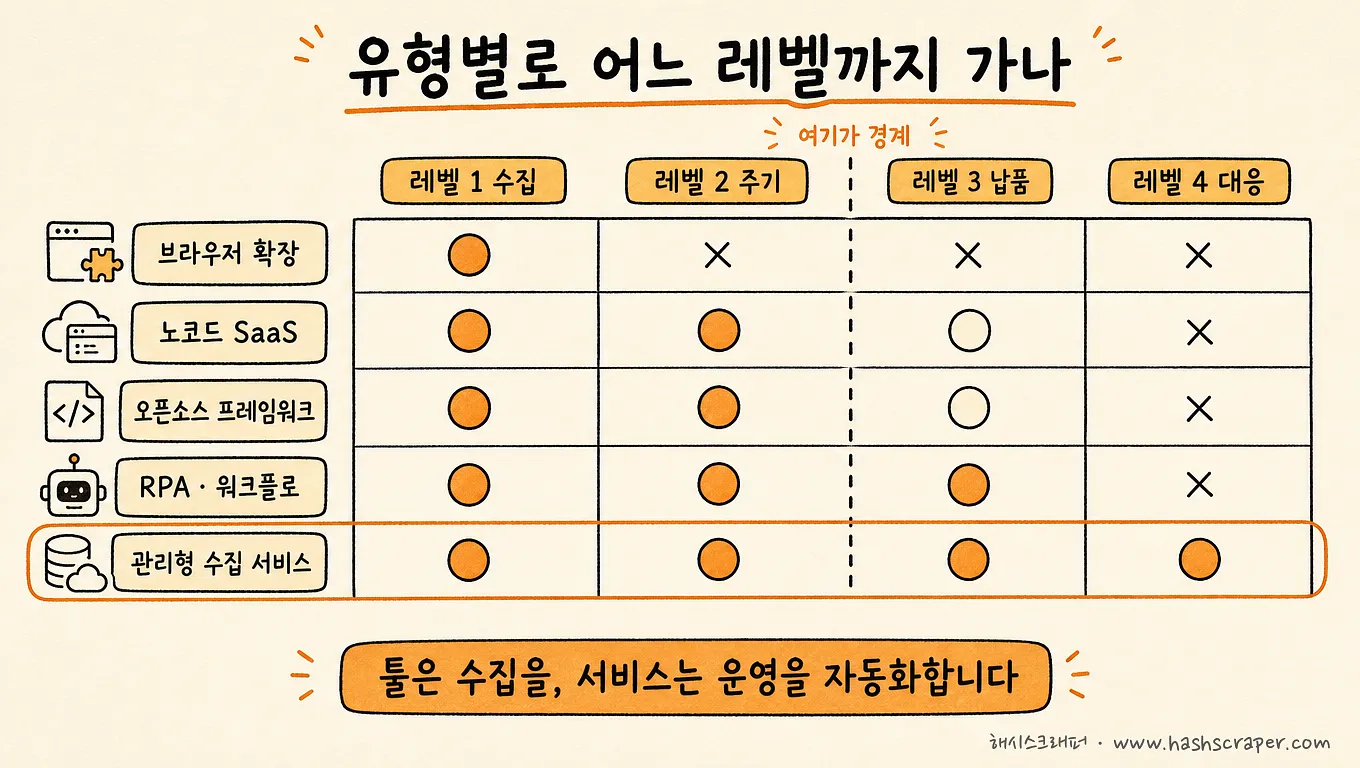
| 유형 | 대표 툴 | 코딩 필요 | 도달 가능한 자동화 레벨 | 유지보수 주체(고치는 사람) | 적합 규모 |
|---|---|---|---|---|---|
| 브라우저 확장 프로그램 | 리스틀리, Web Scraper, Thunderbit | 불필요 | 레벨 1 (수집), 예약 실행이 있는 제품은 레벨 2 | 사용자 | 일회성·소량 |
| 노코드 SaaS | Octoparse, ParseHub, Browse AI | 불필요 | 레벨 1~2 (수집·주기) | 사용자 | 소량~중량 반복 |
| 오픈소스 프레임워크·스크래핑 API | Scrapy, Selenium, BeautifulSoup, Playwright · Apify, Bright Data, Zyte, ScrapingBee, ScraperAPI, Firecrawl | 대부분 필수(개발자용), 일부 제품은 노코드 기능 제공 | 설계하기 나름 (레벨 1~4) | 개발팀 | 팀 역량에 비례 |
| RPA·워크플로 | Zapier, Bardeen, Gumloop | 불필요 | 레벨 2~3 (주기·납품 연결) | 사용자 | 소량·업무 연결 |
| 관리형 수집 서비스 | 해시스크래퍼 | 불필요 | 레벨 1~4 전체 | 업체(구독에 포함) | 지속·대량·업무용 |
세부 요금과 기능은 변동이 잦으므로, 최종 확인은 각 서비스 공식 사이트 기준을 권합니다.
표에서 봐야 할 열은 두 개입니다. 도달 가능한 자동화 레벨과 유지보수 주체. 나머지는 그 두 칸의 결과입니다.
자동화 레벨 4단계: 수집에서 대응까지
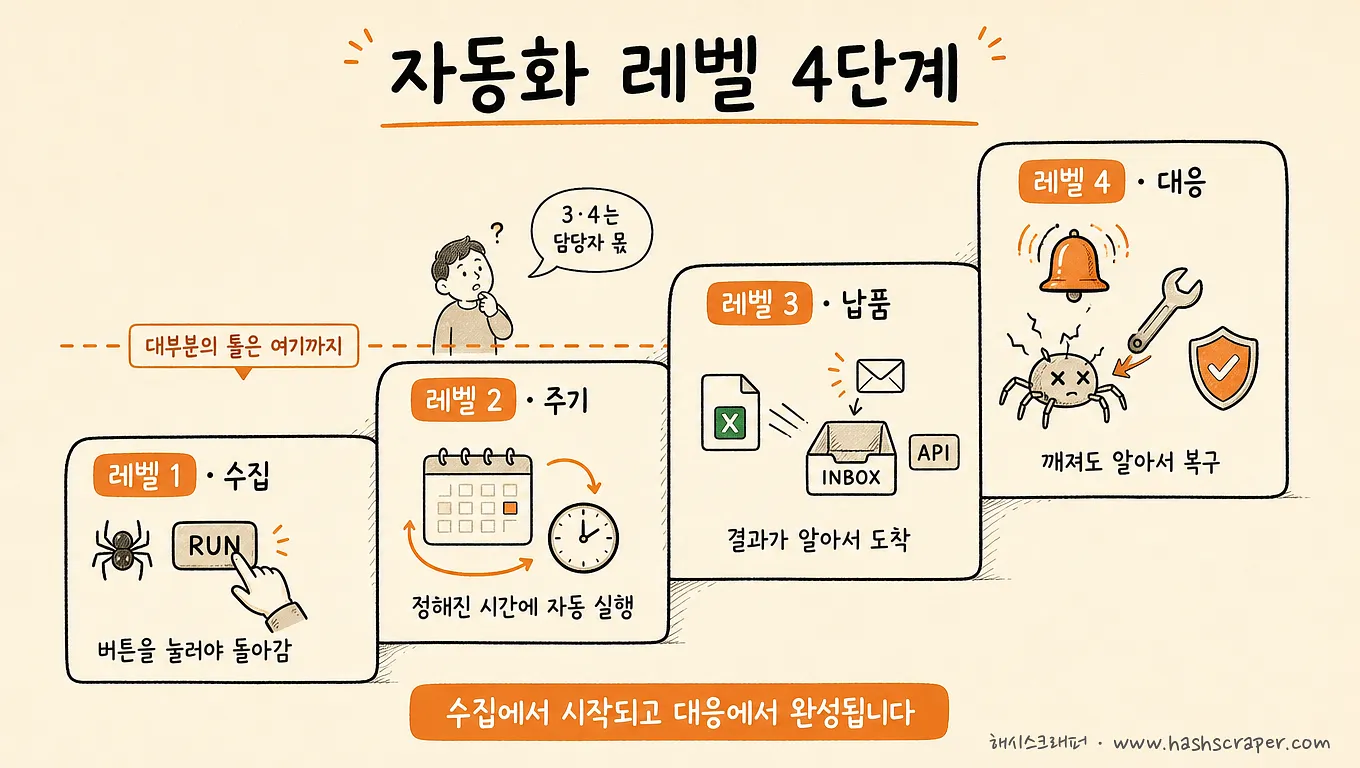
자율주행에는 레벨이 있습니다.
레벨 2는 차선을 유지하고 앞차와 간격도 맞춥니다. 그래도 운전자는 핸들에서 손을 뗄 수 없습니다.
수집 자동화도 똑같습니다. 추천 목록에 오르는 툴 대부분은 레벨 2입니다 — 굴러가는 동안 사람이 지켜봐야 하는 자동화.
| 레벨 | 무엇이 자동화되는가 | 사람이 여전히 하는 일 | 이 레벨을 감당하는 유형 |
|---|---|---|---|
| 레벨 1. 수집 | 화면의 정보가 표 데이터로 추출됨 | 실행 버튼 누르기, 파일 정리 | 5가지 유형 전부 |
| 레벨 2. 주기 | 정해진 시간에 알아서 반복 실행 | 결과 확인, 파일 옮기기, 고장 감시 | 노코드 SaaS, 오픈소스, RPA, 관리형 |
| 레벨 3. 납품 | 결과가 엑셀·이메일·API·DB로 자동 도착 | 이상 여부 확인 | RPA(연결), 오픈소스(구현 시), 관리형 |
| 레벨 4. 대응 | 사이트 개편·차단·수집 누락을 감지하고 복구 | 없음 (업체·개발팀이 감당) | 오픈소스(개발팀 보유 시), 관리형 |
레벨 1 — 수집 자동화. 복사·붙여넣기를 기계가 대신합니다. 위 다섯 유형 모두 여기까지는 해 줍니다. 그래서 여기까지만 보면 어떤 툴이든 좋아 보입니다.
레벨 2 — 주기 자동화. 실행 버튼을 누르지 않아도 정해진 시간에 반복 수집됩니다. 노코드 SaaS의 스케줄러, 오픈소스의 예약 실행이 이 자리입니다. "매주 월요일 아침 수집 파일 만들기"가 달력에서 사라지는 지점이기도 합니다.
레벨 3 — 납품 자동화. 수집 결과가 실무에서 바로 쓰는 형태로 자동 도착합니다. 어떤 형태가 맞는지는 엑셀로 받는 데이터 vs 대시보드로 보는 데이터에 정리되어 있습니다.
레벨 4 — 대응 자동화. 사이트 개편·차단·수집 누락을 감지하고 복구합니다. 대부분의 툴에서 이 레벨은 자동화되지 않고, 담당자의 야근으로 남습니다.
여기서 한 가지를 짚어야 합니다.
자동화 레벨은 덧셈이 아니라 곱셈에 가깝습니다. 앞의 세 레벨이 완벽해도 네 번째가 사람이면, 사람은 결국 계속 대기해야 합니다. 매일 아침 데이터가 도착했는지 확인하는 습관이 생겼다면, 그건 자동화가 아니라 감시 업무가 하나 늘어난 것입니다.
내 레벨을 확인하는 방법은 간단합니다.
지난달 수집 데이터에 빈 날이 있었는지, 있었다면 그걸 누가 언제 알아챘는지만 확인해 보세요.
500개 이상 기업의 수집을 지원하며 본 무너짐의 패턴은 한결같습니다. 툴은 잘 골랐는데, 석 달 뒤 사이트가 개편되고, 고칠 사람이 없어 수집이 조용히 멈춰 있는 경우입니다.
툴은 수집을 자동화하고, 서비스는 운영을 자동화합니다.
관리형 서비스는 이 레벨 4를 담당자 대신 업체가 감당하는 구조입니다. 수집이 멈추면 담당자보다 업체 쪽 모니터링이 먼저 알아채고 복구하는 것이 이 유형의 존재 이유입니다.
해시스크래퍼 고객사 기준, 개별 외주 방식과 비교해 연간 총비용이 68% 절감된 사례도 이 구조에서 나옵니다.
해시스크래퍼로 레벨 1~4를 채우는 화면 경로
레벨을 말로만 나누면 확인할 길이 없습니다. 해시스크래퍼를 예로 어느 화면에서 어디까지 되는지 적어 둡니다. 2026년 11월 2일 공개 페이지와 제품 화면 기준입니다.
| 레벨 | 화면 경로 | 되는 것 | 알아 둘 점 |
|---|---|---|---|
| 레벨 1. 수집 | 크롤링 봇 → 봇 가져오기 → 봇 고르기 → 설정 → 수집 시작 | 공식 봇 126개를 골라 검색어·개수만 넣고 수집 | 목록에 없으면 AI로 봇 만들기(베타)나 작업의뢰 |
| 레벨 2. 주기 | 봇 설정 → 주기 칸 → 수동·간격·매일 | 간격은 10분부터 12시간까지, 매일은 정해진 시각에 | 주기 자동 수집은 매일 무료 크레딧을 쓰지 않고 내 크레딧으로 차감 |
| 레벨 3. 납품 | 데이터셋 → 엑셀 받기 / API, 봇 설정 → 고급 설정 → 웹훅 URL | 엑셀은 이메일로, API로 가져가기, 수집이 끝나면 웹훅으로 알림 | 엑셀은 요청할 때 만들어 보냅니다. 회차마다 저절로 메일이 오지는 않습니다 |
| 레벨 4. 대응 | 따로 누를 화면 없음 | 공식 봇은 해시스크래퍼가 동작을 확인하고 차단에 대응, 구독제는 사이트 개편·차단 대응과 개발 요청 포함 | 범위는 공식 봇과 구독제 기준입니다 |
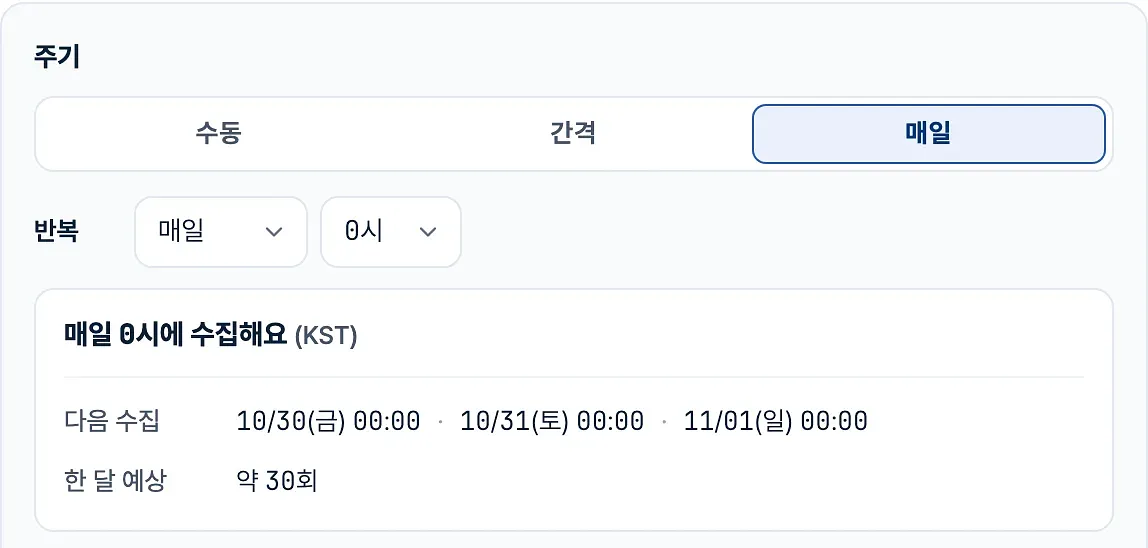
실제로 눌러 본 기록은 따로 정리해 두었습니다. 2026년 10월 29일 티스토리 공개 봇으로 글 10건을 1분 만에 받아 엑셀까지 요청한 순서는 코딩 없이 웹 데이터 수집하기에, 같은 봇에 매일 주기를 거는 화면은 주기 수집과 엑셀 자동 정리에 캡처와 함께 있습니다.
못 하는 것도 적어 둡니다. AI로 봇 만들기는 로그인해야 보이는 페이지와 로봇 확인(캡차)이 뜨는 페이지를 만들 수 없고, 저장한 봇은 관리자 확인(보통 1영업일)을 거쳐야 수집할 수 있습니다. 이런 경우는 작업의뢰나 구독제로 넘어갑니다.
우리 회사는 지금 몇 레벨? 자가진단 5문
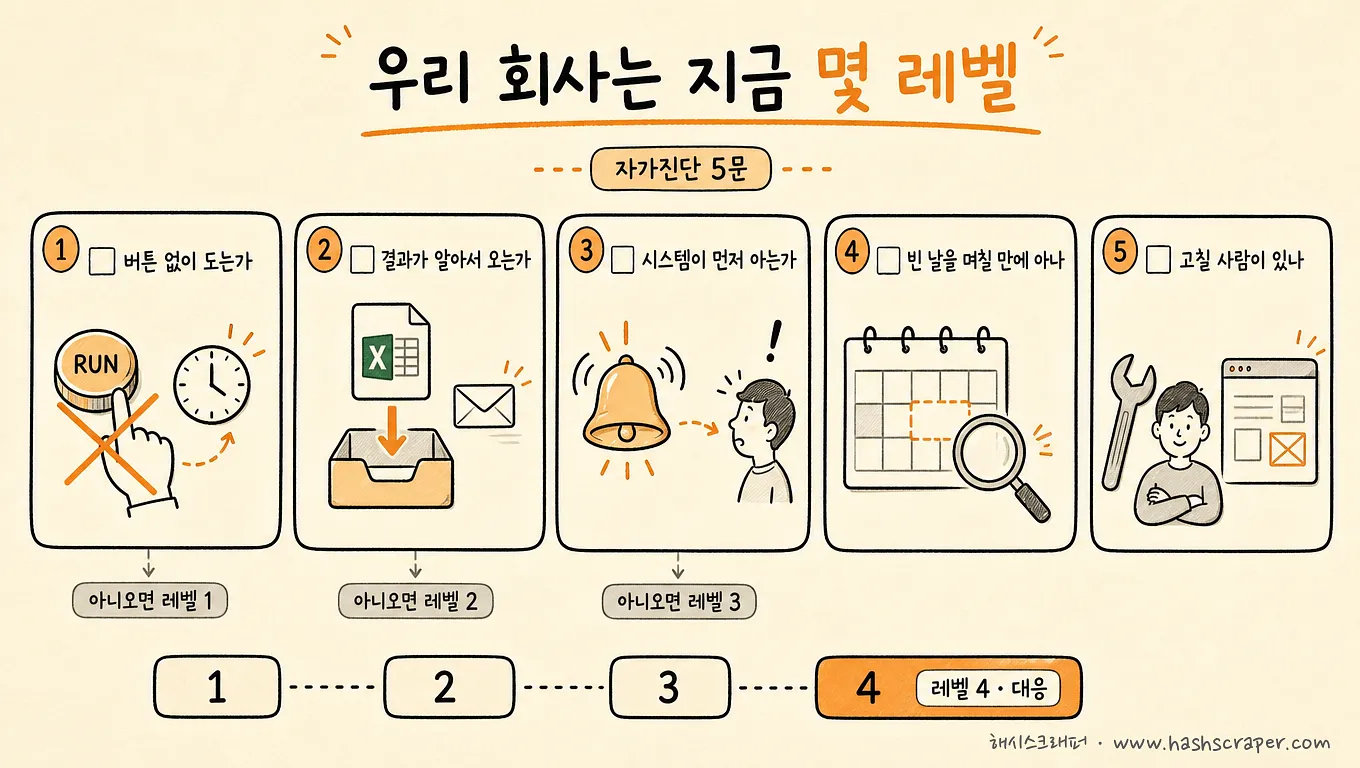
체크해 보세요. 추천 목록 열 개보다 이 다섯 줄이 빠릅니다.
- [ ] 실행 버튼을 누르지 않아도 수집이 도는가? → 아니오면 레벨 1
- [ ] 수집 결과가 손대지 않아도 엑셀·메일·API로 도착하는가? → 아니오면 레벨 2
- [ ] 수집이 멈춘 것을 사람보다 시스템이 먼저 아는가? → 아니오면 레벨 3
- [ ] 지난달 데이터에 빈 날이 있었는가, 있었다면 며칠 만에 알아챘는가?
- [ ] 사이트가 개편돼 수집이 깨졌을 때, 고칠 사람이 사내에 있는가?
앞의 세 문항이 당신의 현재 레벨을 알려줍니다.
뒤의 두 문항은 방향을 알려줍니다. 빈 날을 늦게 알아챘고 고칠 사람도 없다면, 레벨 4는 툴을 바꿔서 오르는 칸이 아니라 유형을 바꿔야 오르는 칸입니다.
레벨을 한 칸 올리는 4단계
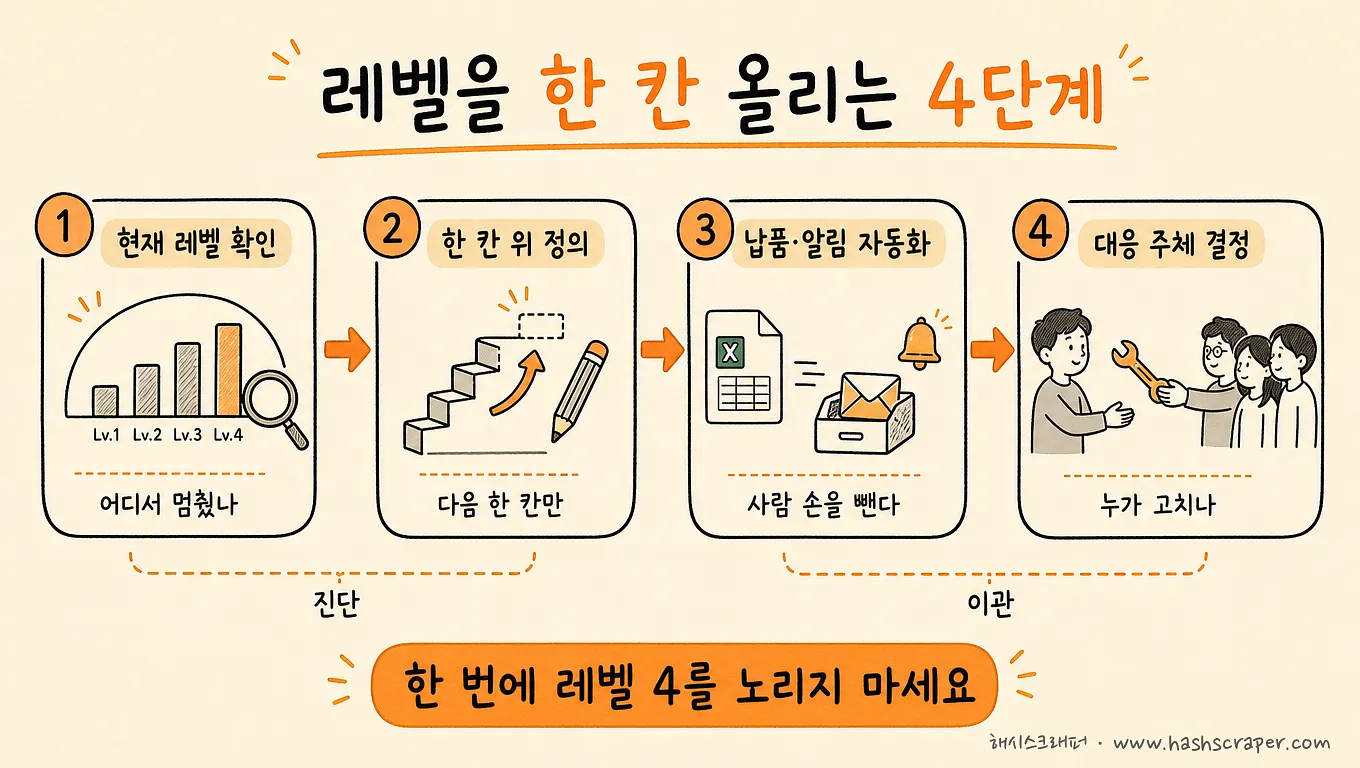
1단계. 현재 레벨을 숫자 하나로 적는다. 위 자가진단 결과 그대로입니다. 대부분의 팀은 1 또는 2에 있습니다. 여기서 자책할 이유는 없습니다 — 툴이 거기까지만 팔기 때문입니다.
2단계. 업무가 요구하는 레벨을 정한다. 가끔 한 번 뽑아 쓰는 데이터라면 레벨 1로 충분합니다. 매주 보고서에 들어간다면 최소 레벨 3입니다. 수집 공백이 가격 대응·매출에 바로 영향을 준다면 레벨 4가 요구 조건입니다.
3단계. 그 레벨에 도달하는 유형만 후보로 남긴다. 위 비교표에서 해당 레벨 칸을 보면 유형이 한두 개로 줄어듭니다. 툴 이름은 그다음에 고르면 됩니다. 도입이 무너지는 전형적 경로는 웹 스크래핑 프로젝트가 실패하는 5가지 이유에 정리해 두었습니다.
4단계. 한 달 돌려보고 멈추지 않는 쪽을 남긴다. 남은 후보 두세 개를 무료 플랜이나 데모로 직접 돌려 보세요. 검증 축은 "잘 돌아가는가"가 아닙니다. "멈췄을 때 누가 먼저 알았는가"입니다.
수집 방법의 전체 지형이 궁금하다면 웹 데이터 추출 4가지 방법 비교를 함께 보시면 됩니다.
오늘 할 일은 툴 설치가 아닙니다. 우리 자동화가 몇 레벨인지, 숫자 하나를 적는 것입니다.
자주 묻는 질문
Q. 웹 데이터 수집 자동화 툴 추천해줘. 무엇을 쓰면 되나요?
A. 유형으로 답하는 것이 정확합니다. 화면 소량 추출은 브라우저 확장 프로그램(리스틀리, Web Scraper, Thunderbit 등), 직접 운영하는 반복 수집은 노코드 SaaS(Octoparse·ParseHub·Browse AI 등), 개발팀의 자체 구축은 오픈소스 프레임워크(Scrapy·Selenium·Playwright 등)나 스크래핑 API·플랫폼(Apify·Bright Data·Zyte·ScrapingBee·ScraperAPI·Firecrawl 등), 수집 후 업무 연결은 RPA·워크플로 툴(Zapier·Bardeen·Gumloop 등), 쿠팡·네이버 같은 국내 사이트를 코딩 없이 받거나 운영까지 맡기는 지속 수집은 해시스크래퍼입니다. 후보를 좁히는 기준은 "필요한 자동화 레벨이 몇인가"입니다.
Q. 해시스크래퍼는 맡기는 서비스만 되나요? 직접 돌릴 수도 있나요?
A. 둘 다 됩니다. 소량·비정기 수집은 크레딧으로 공식 크롤링 봇을 직접 실행하고, 주기를 걸고, 엑셀이나 API로 받습니다. 가입하면 1만 크레딧을 받고, 직접 실행한 수집에는 매일 1,000 크레딧이 무료로 먼저 쓰입니다. 정기적으로 많은 데이터가 필요하면 구독제로 개발·유지보수·차단 대응까지 맡깁니다.
Q. 오픈소스는 무료인데 그게 최선 아닌가요?
A. 라이선스만 무료입니다. 크롤러를 만들고 사이트가 바뀔 때마다 고치는 개발자의 시간이 실제 비용입니다. 개발팀이 있고 수집이 핵심 역량이라면 좋은 선택이고, 레벨 4까지 직접 설계할 수 있는 유일한 유형이기도 합니다. 아니라면 총비용이 더 커지는 경우가 많습니다.
Q. RPA와 크롤링 툴은 무엇이 다른가요?
A. 크롤링 툴은 웹에서 데이터를 꺼내는 일(수집)을, RPA·워크플로 툴은 꺼낸 데이터를 옮기고 연결하는 일(업무 흐름)을 자동화합니다. 레벨로 보면 크롤링 툴은 레벨 1~2, RPA는 레벨 2~3 구간에 강합니다. 서로 대체재가 아니라 보완재에 가깝습니다.
Q. 자동화가 멈추면 누가 고치나요?
A. 이 질문이 사실상 유형 선택의 기준입니다. 확장 프로그램·노코드 SaaS·RPA는 사용자, 오픈소스는 개발팀, 관리형 서비스는 업체가 고칩니다. 해시스크래퍼는 사이트 변경·차단 대응을 구독에 포함해 처리합니다.
Q. 추천 목록에 늘 나오는 Octoparse나 Selenium이면 충분하지 않나요?
A. 둘 다 좋은 도구지만 유형이 다릅니다. Octoparse는 직접 운영하는 노코드 SaaS(레벨 1~2), Selenium은 개발자가 코드를 짜는 재료입니다. 납품·대응(레벨 3~4)까지 필요한 업무라면 도구가 아니라 유형 자체를 다시 골라야 합니다.
결론
자동화 툴 선택은 "가장 좋은 툴 찾기"가 아닙니다. "몇 레벨까지 자동화할 것인가"를 정하는 일입니다.
- 레벨 1(수집)만 필요 → 브라우저 확장 프로그램
- 레벨 2(주기)까지 직접 운영 → 노코드 SaaS, 개발팀이 있다면 오픈소스 프레임워크
- 레벨 3(납품) 연결이 핵심 → RPA·워크플로 툴 병행
- 레벨 4(대응)까지 맡김 → 관리형 수집 서비스
레벨을 정했다면 그다음은 간단합니다. 그 레벨을 감당하는 유형 안에서 후보 두세 개를 직접 돌려 보고, 한 달 뒤에도 멈추지 않고 돌아가는 쪽을 남기면 됩니다.
자동화는 켜는 순간이 아니라, 아무도 보지 않는 셋째 달에 판가름 납니다.
툴을 하나 더 깔지 마세요. 레벨을 한 칸 올리세요.
지금 바로 시작하기
수집하려는 사이트와 주기, 받고 싶은 형태(엑셀·API 등)를 알려주시면, 노코드 툴로 충분한 레벨인지 레벨 4 대응까지 필요한 규모인지 무료로 진단해 드립니다. 직접 해 보려면 가입 시 받는 1만 크레딧으로 공식 크롤링 봇부터 돌려 보셔도 됩니다.


