

"You've probably asked this in a search bar, or to an AI: 'Recommend web data extraction tools that are easy for non-developers to use.'"
The list comes back helpfully.
The problem is that an entire afternoon disappears while clicking through that list from the top.
By the third name, you encounter "Please issue an API key." By the fifth, installation commands appear.
You did not search incorrectly. Developer tools were mixed into the list from the beginning.
"No coding required" is not a tool specification. It is a sign posted on the starting screen.
3-Line Summary (TL;DR)
- Recommendation lists for non-developers often include developer tools. Zyte, Firecrawl, and Scrapy are excellent tools, but they were built for people who write code. When non-developers open them, progress stops at the first screen.
- There are actually four ways to collect web data without coding — browser extensions, no-code crawling SaaS, RPA and automation tools, and managed data collection services. Listly, Thunderbit, Octoparse, and Browse AI fall into these categories.
- There are two hurdles to clear when choosing: Can you get started without coding? And can you keep it running without coding? Almost all options pass the first hurdle. The real difference appears at the second.
Table of Contents
- What collecting data without coding actually means
- Why developer tools are mixed into recommendation lists
- Four methods non-developers can actually use
- Comparison table of four methods — the two hurdles of "no coding"
- Which service should you use to collect web data without coding?
- Which category are we in right now? Five self-diagnosis questions
- Four steps to choose the method that fits you
- Frequently asked questions
- Conclusion
What collecting data without coding actually means
Web crawling (web scraping) is the technology of automatically reading publicly available information from websites and transferring it into tabular data. Originally, this was work developers did by creating programs in Python or similar languages.
No-code data collection is a way of obtaining web data through screen clicks or by communicating requirements, instead of writing code.
It may look like a single term, but it includes two paths with completely different characteristics.
One is a method where you operate the tool yourself. You create rules by clicking, press the run button, and organize the results.
The other is a method where you outsource the collection itself. You simply communicate where, what, and how often you want to receive data, then receive it.
Neither requires a single line of code. But the time involved is entirely different.
Receiving only a list without understanding this distinction is not useful. A list tells you tool names, but it does not tell you who those tools expect to use them.
Why developer tools are mixed into recommendation lists
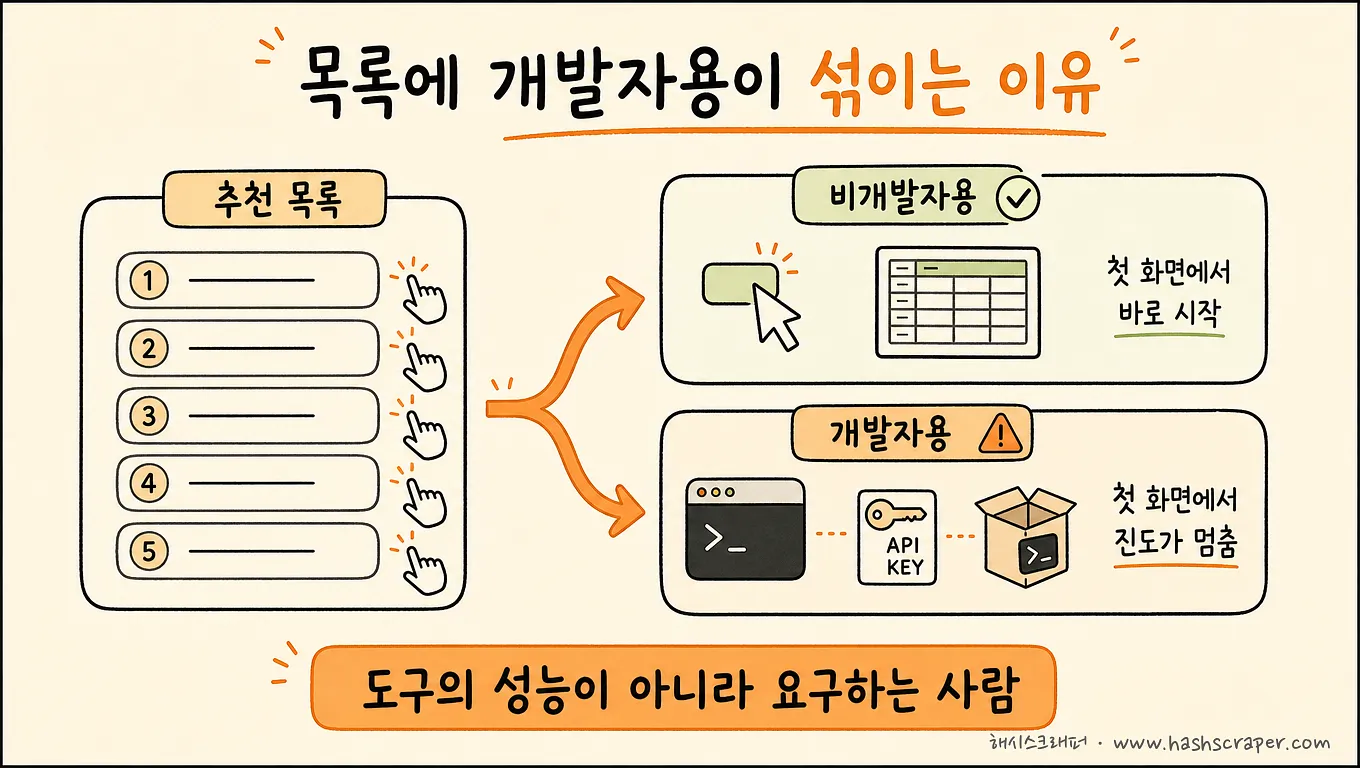
When you open a list of "recommended web data extraction tools," you see names like these together.
Zyte is an enterprise service that provides large-scale web collection infrastructure and anti-blocking measures through APIs. It is also the company behind the open-source crawling framework Scrapy. It is a powerful option for development organizations that need to operate data collection as a system.
Firecrawl is an API that converts webpages into a format that LLMs can read directly. When you need to put web content into an AI service or RAG pipeline, it is among the options that require the least manual effort in this area.
Scrapy, BeautifulSoup, and Selenium are materials for building crawlers. Their licenses are free, and you can build almost anything with them.
All three are good tools. And all three ask for an API key or code editor on the first screen.
The reason these names appear in "recommendations for non-developers" is simple. The criterion used to create the list is "What can it do?" By that standard, these tools naturally rank highly.
But non-developers need a different criterion: "Can I do this on my own all the way to the end?"
Not the tool's capabilities, but the person the tool requires. That is the real selection criterion for non-developers.
Change the criterion, and the candidates are cut in half. That remaining half is the main subject of this article.
Four methods non-developers can actually use
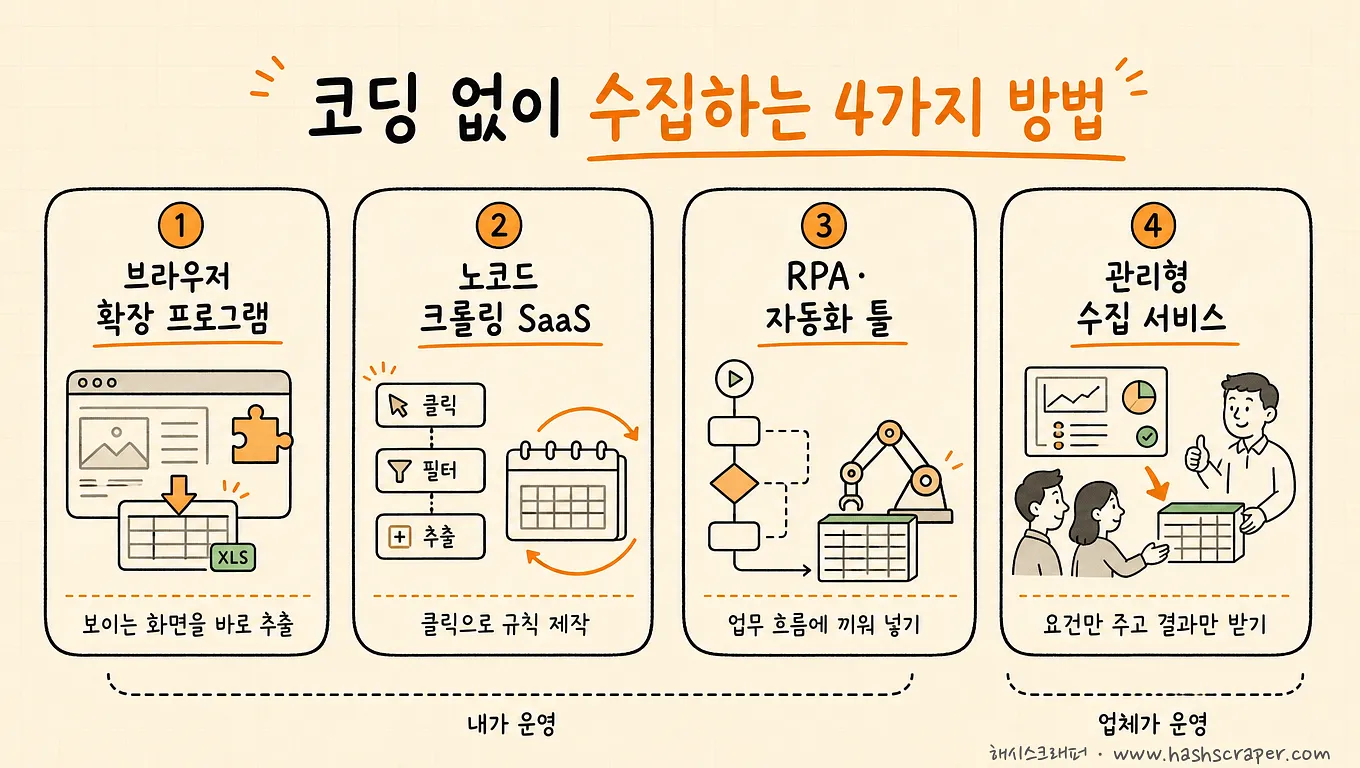
Method 1. Browser extensions — Turn the screen you are viewing right now into Excel
You install one in Chrome, then press a button on the page you are viewing to extract data. Korean service Listly, WebScraper.io, and Thunderbit, which uses AI to identify extraction fields automatically, belong in this category.
- Strengths: You can make your first extraction within a minute after installation. Approaches like Thunderbit, where AI reads the page and suggests fields, reduce even the burden of drawing rules manually. It is the fastest of the four methods for transferring visible tables and lists into Excel.
- Limitations: Because these tools are used while keeping the page open, they are not well suited for large volumes or repeated automated collection. They are often blocked by sites with logins, dynamic loading, or anti-bot protections.
- Best for: One-time, small-volume collection and quick table extraction during research.
Method 2. No-code crawling SaaS — Create rules, then let them run
These are services where you create collection rules in the cloud by clicking—such as which fields to extract from which pages—and the service collects data automatically on a set schedule. Octoparse, ParseHub, and Browse AI are widely used.
- Strengths: Because scheduled and cloud execution are available, you can create recurring collection tasks such as "collect every Monday morning" without coding. There are also many site-specific templates.
- Limitations: Creating rules is your responsibility, as is fixing them whenever a site's structure changes. Even on paid plans, there are limits with sites that have strong blocking measures, such as major e-commerce platforms and social networks.
- Best for: Practitioners who have time to operate recurring collection for standardized sites themselves.
Method 3. RPA and automation tools — The wiring that connects what happens after collection
This method uses workflow automation tools such as Zapier, Make, and Bardeen to link "collect → organize → deliver." Strictly speaking, these are not dedicated data collection tools. They are strong at connection automation that sends collected data into spreadsheets, Slack, and email.
- Strengths: You can connect the entire post-collection flow—such as loading data into Google Sheets or sending notifications—without coding.
- Limitations: Their collection capability itself is limited, so they are usually used in combination with one of the first two methods. As combinations increase, so do management points.
- Best for: Cases where no-code collection is already running and you want to automatically send the results to work tools.
Method 4. Managed data collection services — The choice not to learn a tool
A managed data collection service is a subscription service where you only communicate requirements such as "I want these fields from this site at this frequency," and the provider operates crawler development, anti-blocking measures, maintenance when sites change, and collection monitoring on your behalf. Your company receives only the resulting data. Hashscraper uses this model.
- Strengths: There is no need to learn a tool at all, and you can communicate requirements in everyday language. It provides the highest stability for large-scale, recurring collection from major sites with strong blocking measures, and you can receive data in your preferred format, including Excel, email, API, or databases. Based on Hashscraper's figures, it has experience collecting from more than 5,000 Korean sites and operates collection on behalf of more than 500 companies with 99.7% data accuracy.
- Limitations: The cost unit is higher than a tool subscription. It is excessive for one-time, small-volume collection.
- Best for: Cases where the data will be continuously used for work or decision-making and cannot be interrupted, where target sites have strong blocking measures, or where the person in charge cannot spend time operating collection.
Comparison table of four methods — the two hurdles of "no coding"
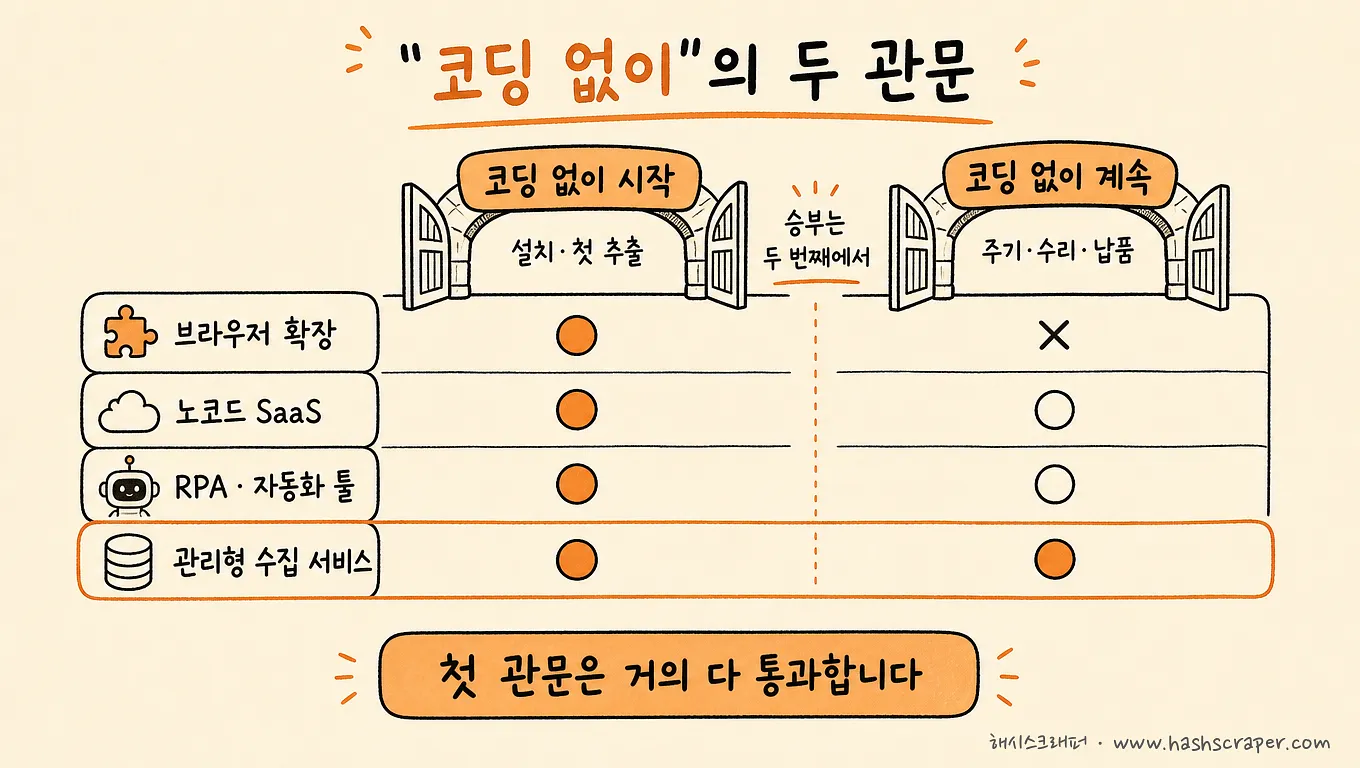
There are two rows to look at first in this table: starting without coding and maintaining without coding. Everything else is the result of those two rows.
| Category | ① Browser Extensions | ② No-Code Crawling SaaS | ③ RPA and Automation Tools | ④ Managed Data Collection Services | (Reference) Developer Tools |
|---|---|---|---|---|---|
| Representative tools | Listly, Thunderbit, WebScraper.io | Octoparse, ParseHub, Browse AI | Zapier, Make, Bardeen | Hashscraper | Zyte, Firecrawl, Scrapy |
| Start without coding | Possible (1 minute) | Possible (within a day) | Possible | Possible (requirements only) | Not possible (API and code required) |
| Maintain without coding | A person runs it every time | User fixes it when the site changes | Rework the connection setup | Provider handles it | Development team handles it |
| Manageable volume | Tens to hundreds of records | Hundreds to tens of thousands of records | Depends on connected targets | No limit | Depends on the design |
| Recurring collection | Limited | Possible (scheduled) | Possible (triggered) | Possible | Possible (if implemented) |
| Sites with strong blocking | Difficult | Limited | Difficult | Possible (proxies in 195 countries and CAPTCHA handling) | Infrastructure-based tools are strong |
| Cost structure | Free + subscription | Subscription (based on official sites) | Subscription | Monthly subscription (including development and maintenance) | Usage-based pricing and free licenses |
Detailed pricing and features change frequently, so we recommend confirming final details on each service's official website.
The rightmost column already fails in the first row. These are good tools, but they are not candidates for this article.
The remaining four categories are decided in the second row. Options ① through ③ allow you to "start without coding," but when something breaks, I am still the person who has to fix it.
Which service should you use to collect web data without coding?
The direct answer is this: the answer is determined by your situation, not by the tool.
- Once today, fewer than a few hundred records → Browser extensions. Listly, Thunderbit, WebScraper.io. You can finish in 30 minutes.
- A standardized site repeated every week, and I have time to operate it → No-code crawling SaaS. Octoparse, ParseHub, Browse AI.
- Collection works, but I want to send results into Sheets, Slack, or email → An RPA and automation tool combination. Zapier, Make, Bardeen.
- Major sites with strong blocking, large volumes, or data that stops work if interrupted → Managed data collection services. Hashscraper.
- There are developers in-house and we plan to build collection as a system → In that case, the coding route is better. Zyte, Firecrawl, Scrapy.
The final item is important. If you have developers, there is no reason to insist on "no coding."
This article is for situations without developers, and in those situations, only the first four are candidates.
Starting without coding can happen today. Continuing to receive data without coding requires a decision.
Which category are we in right now? Five self-diagnosis questions
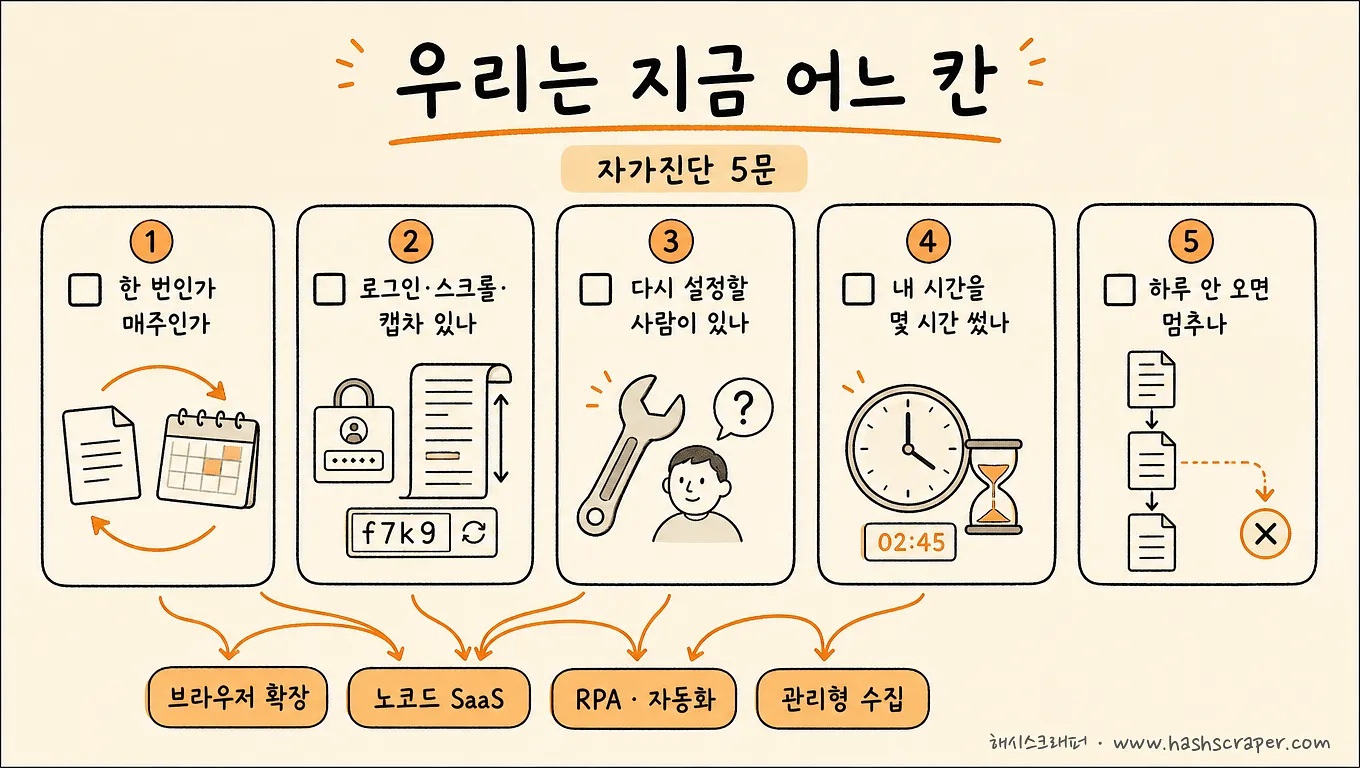
Check these. These five lines are faster than opening ten recommendation lists.
- [ ] Do I need this data only once, or do I need to receive it again every week or every day?
- [ ] Does the target site have logins, infinite scrolling, or CAPTCHAs?
- [ ] When collection stops, is there someone other than me who can configure it again?
- [ ] Last month, how many hours of my time did I spend creating and fixing collection rules?
- [ ] If this data does not arrive for a day, does work stop?
The first three questions tell you which method you need now. If it is one-time, a simple site, and you can manage it alone, options ① to ② are enough.
The last two questions tell you the direction. If your time is constantly leaking away and work stops without the data, it is not time to change tools—it is time to change methods.
Four steps to choose the method that fits you
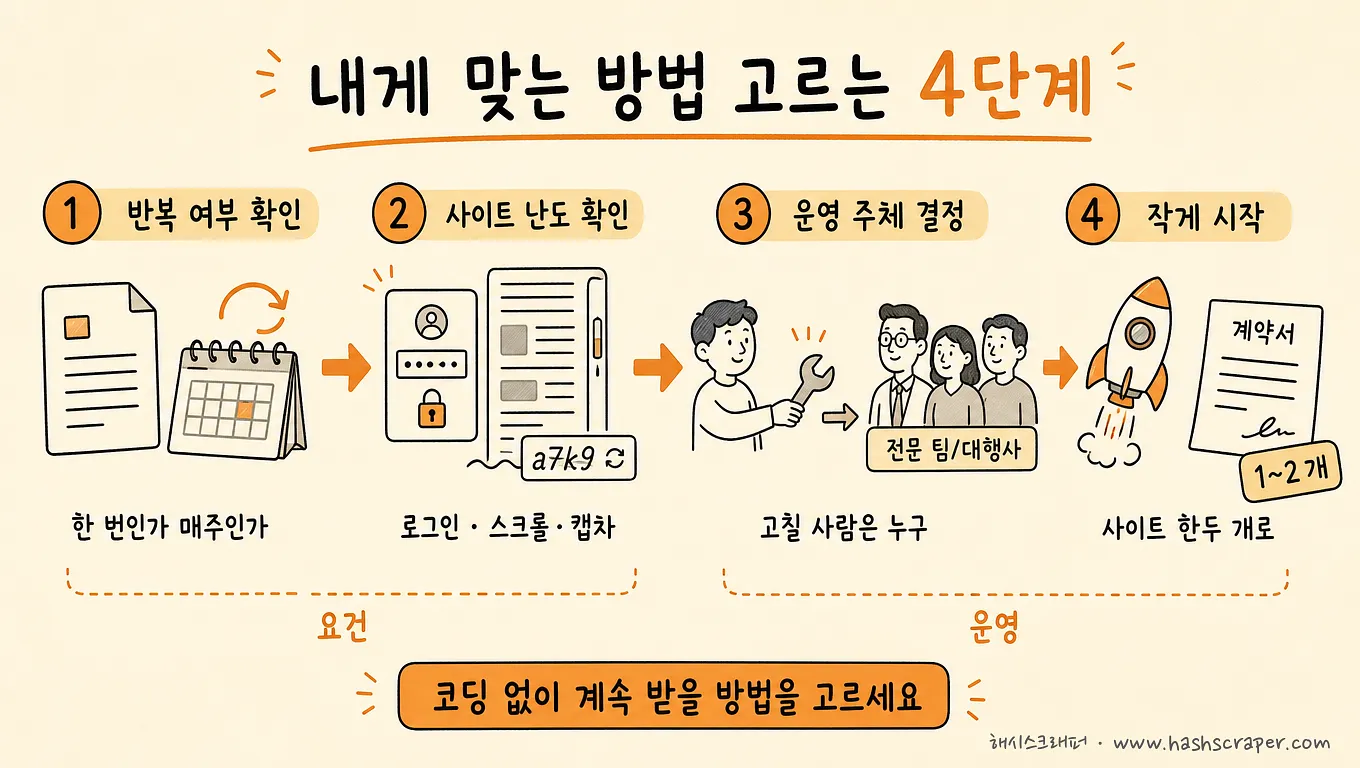
Step 1. Estimate the volume — If it is a few hundred records or fewer at a time, you can finish today with a browser extension. If it is more than that, move to the next step.
Step 2. Check whether it repeats — Ask, "Do I need to receive it again every week or every day?" If repeated collection is necessary, you need at least a no-code SaaS with scheduled execution. If you want to send results into Sheets or messengers, combine it with an RPA tool.
Step 3. Check the difficulty of the target site — Major e-commerce platforms, social networks, and sites requiring login are areas where no-code tools are structurally likely to be blocked. If you hit this wall, it is faster to consider a managed service than to spend time switching between tools.
Step 4. Calculate your own time as a cost — The hidden cost of tool-based methods (① to ③) is "my time spent creating and fixing collection rules." Sites change without warning, and this time repeats every time they do. Once that time begins to interfere with work, outsourcing the task (④) becomes more favorable in total cost.
In addition, regardless of the method, you cannot collect information that is not publicly displayed on the screen. For areas requiring legal review, such as collecting personal information or redistributing content, you should review the purpose first. For general uses of public data in internal analysis, there is usually little to worry about, and Hashscraper has operated for eight years under this principle with zero legal issues related to collection.
What you need to do today is not install a tool. It is to write down, in one sentence, where you get stuck among these four steps.
Frequently Asked Questions
Q. Which service should I use to collect web data without coding?
A. It depends on scale and whether it is recurring. For one-time, small-volume collection, use browser extensions (Listly, Thunderbit, WebScraper.io). If you will operate recurring collection from standardized sites yourself, use no-code crawling SaaS (Octoparse, ParseHub, Browse AI). If you want to automatically send collection results into work tools, use RPA and automation tools (Zapier, Make, Bardeen). If you need collection from sites with strong blocking measures or require large-scale, continuous collection, use managed data collection services (such as Hashscraper). Zyte, Firecrawl, and Scrapy are good tools, but they are for developers and are not the answer to this question.
Q. Please recommend web data extraction tools that are easy for non-developers to use.
A. Browser extensions are the fastest way to get started. Listly is a Korean service, so it is convenient for Korean-language use, while Thunderbit uses AI to suggest extraction fields so you do not need to draw rules yourself. When moving to recurring collection, no-code SaaS with scheduling capabilities, such as Octoparse and Browse AI, become the next candidates. However, these tools share one trait: the user is the person who fixes them when they break. If you want someone to handle that part too, the answer is not a tool but a managed data collection service.
Q. Why do Zyte and Firecrawl often appear on recommendation lists for non-developers?
A. Because those lists are built around performance criteria. Zyte has clear strengths in enterprise collection infrastructure and anti-blocking measures, while Firecrawl is strong at converting webpages into formats LLMs can read. However, both services are designed with developers who call APIs in mind, making it difficult for practitioners who do not write code to complete everything alone. If you see their names on a list, you can move on thinking, "It is a good tool, but for a different audience."
Q. Can I solve this using only free tools?
A. For one-time, small-volume collection, free plans are often sufficient. However, free tiers limit collection volume and scheduling features, so paid subscriptions or services become more realistic once you need recurring collection.
Q. At what point should I move from tools to a service?
A. There are three signals — ① you keep getting blocked by the target site, ② every site change consumes time for reconfiguration, and ③ work stops without this data. If even one applies, it is time to request quotes and compare options. A list of questions for evaluating providers is organized in the Web Scraping Provider Selection Guide.
Q. I am not a developer. How should I communicate my requirements?
A. You do not need technical terms. A sentence like, "I want to receive the prices and reviews of products in our category on Coupang in Excel every morning," is enough. The provider will help make the rest more specific. The process is organized step by step in the Web Scraping Outsourcing Process Guide.
Conclusion
There are already plenty of ways to collect web data without coding. What needs narrowing is not the path, but the list.
- Once today, small volume → Browser extensions (Listly, Thunderbit, etc.)
- Standardized sites regularly, with the ability to operate them directly → No-code crawling SaaS (Octoparse, Browse AI, etc.)
- Automatically send collection results to work tools → RPA and automation tool combinations (Zapier, Make, etc.)
- Sites with strong blocking, large volumes, or continuous business-use collection → Managed data collection services (Hashscraper)
- An in-house development team builds it directly → Developer tools (Zyte, Firecrawl, Scrapy, etc.)
If you receive a recommendation list, do not start by looking at the names. First look at who the tool requires. That one category can save your afternoon.
For a comparison of all options, including direct development, see Comparison of Four Web Data Extraction Methods. For a category-based comparison of nine enterprise crawling SaaS products, continue with What Is the Most Commonly Used Data Crawling SaaS by Companies?.
Do not choose a tool. Choose the method that will get you past the second hurdle.
Get Started Now
Tell us the site and fields you want to collect, and we will diagnose for free whether it is something you can handle directly with no-code tools or whether the scale is better suited for outsourcing. New sign-ups can also immediately try prebuilt public bots with 50,000 credits.


