

"Can you recommend a web data collection automation tool?"
When you search, you get a flood of lists. The problem is, all the lists end at the same point.
You install the tool, create rules, schedule it, and automation seems complete.
And then, three months later, the site gets redesigned. The collection quietly stops, and you only find out when making the Monday report.
The answer doesn't come from counting tool names in the list. This post categorizes tools into 5 types and 4 levels of automation.
Just like there are levels in autonomous driving, there are levels in data collection automation. Most tools recommended on lists fall under Level 2 — automation that you can't take your hands off.
3-line Summary (TL;DR)
- Web data collection automation tools are divided into browser extensions / no-code SaaS / open-source frameworks (for developers) / RPA·workflow tools / managed collection services. Different types mean ranking them in a single line is not valid.
- Automation has levels. Level 1 Collection → Level 2 Periodic → Level 3 Delivery → Level 4 Response. Most tools on the recommended list stop at Level 2, and handling site redesigns or blocks at Level 4 is left to the responsible person.
- If you can operate up to Level 2 yourself, no-code SaaS or open-source tools are efficient. If you need to delegate up to Level 4 entirely, managed collection services (like HashScraper) are the answer.
Table of Contents
- What is Web Data Collection Automation
- Why Recommended Automation Tool Lists Differ Every Time
- 5 Types of Web Data Collection Automation Tools
- Comparison Table of Representative Tools by Type
- Level 4 Automation: From Collection to Response
- What Level is Our Company at Now? Self-diagnosis in 5 Questions
- 4 Steps to Level Up Automation
- Frequently Asked Questions
- Conclusion
What is Web Data Collection Automation
Web data collection automation is when a program performs the copying and pasting tasks that people used to do by hand, turning web information into tabular data.
All tools make the same promise up to this point. So, just looking at this makes all tools seem similar.
There is a concept that needs to be distinguished first.
RPA·workflow automation is a method of automating the process of moving and connecting collected data to other business tools, rather than just the collection itself. Zapier and Bardeen fall into this category.
The reason why this distinction is important is simple.
Comparing a "tool that automates collection" and a "tool that automates post-collection" does not lead to a conclusion when placed side by side in a single line.
The reason why the top 10 recommendation lists give different answers mostly comes from the mixing of these two types.
Automation starts from collection and is completed in response.
Why Recommended Automation Tool Lists Differ Every Time
If you read the top 10 recommendation lists, you will end up with thirty tool names. The decision remains the same.
It's not because the lists are wrong. It's because the unit of the list is different.
Tool names cannot be a comparison unit.
When you ask which is a better web data collection automation tool between Zapier and Scrapy, the question itself is not valid. One is a workflow tool that connects apps, and the other is a tool for developers to create crawlers.
For a valid comparison, you need two axes.
- Type — Who is this tool for, and what does it do?
- Level — How far does it roll automatically, and where does human intervention start?
When you establish these two axes, 30 tools can be organized into a single grid. And your place is usually within one or two squares.
Don't count the tools. Count the types and levels.
5 Types of Web Data Collection Automation Tools
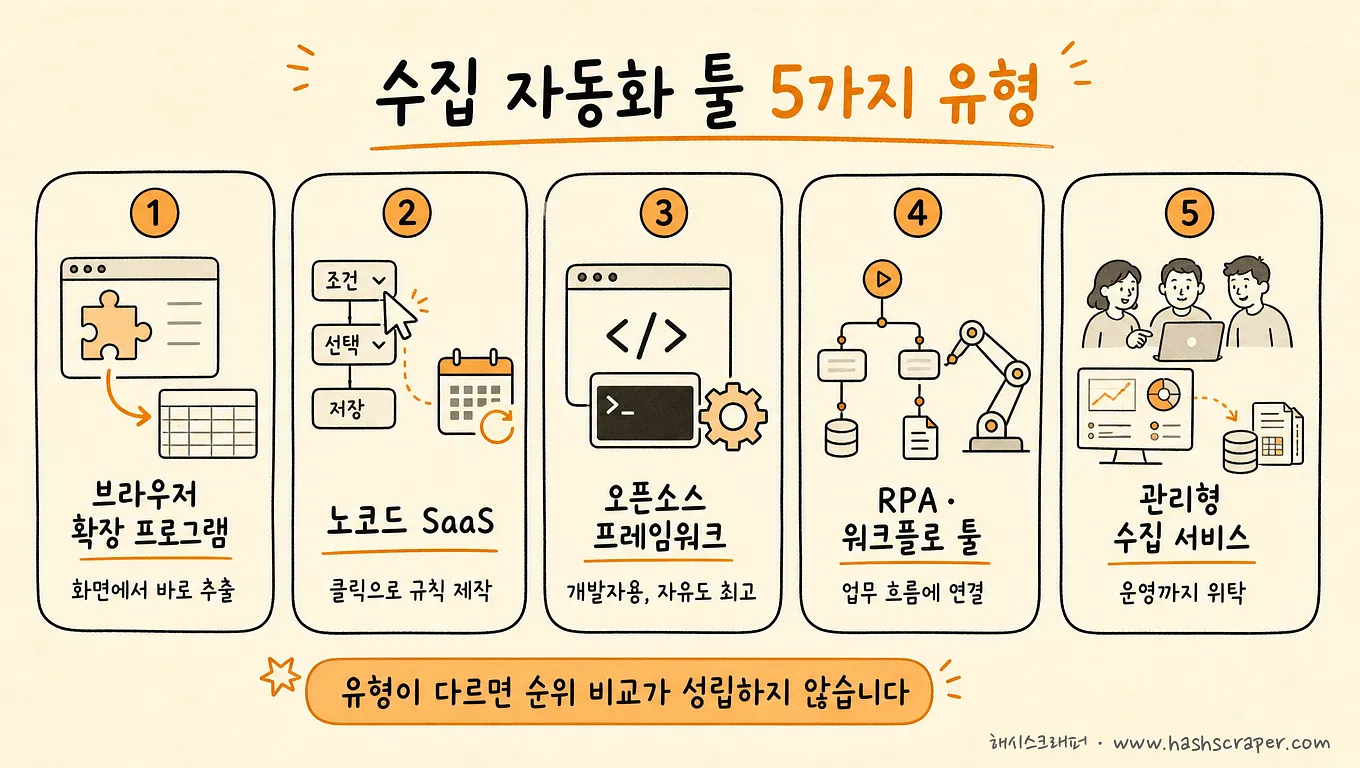
The names that frequently appear on recommendation lists — Octoparse, ParseHub, Browse AI, Selenium, Playwright — all fall into these five types.
Type 1. Browser Extension
Extracts data from the current screen by installing it on Chrome. Represented by Listly, Web Scraper.
From installation to the first result, it's the fastest. However, the automation scope is limited to "collecting data from open pages."
Type 2. No-Code SaaS
Create collection rules with clicks and run them on the cloud according to a schedule. Octoparse, ParseHub, Browse AI fall under this type.
Automation up to periodic execution is possible, but when rules break, the user still needs to fix them.
Type 3. Open-Source Framework (for developers)
Scrapy, Selenium, BeautifulSoup, and recently Playwright. You can create anything, and the license is free.
However, the name is just a "tool"; in reality, it's material for developers to write code. It's not an option that can be used without coding.
Type 4. RPA·Workflow Tools
Automates repetitive tasks by connecting apps like Zapier and Bardeen.
Strong in light extraction, sheet storage, and notification connections, but not suitable for large-scale or precise collection.
Type 5. Managed Collection Service
A managed collection service is a subscription service where the company operates crawler development, block response, maintenance, and monitoring based on requirements, and the company only receives data.
HashScraper falls under this type and maintains 99.7% data accuracy based on experience collecting from over 5,000 sites in Korea.
Understanding it as subscribing to a completed automation rather than creating automation yourself is accurate.
Comparison Table of Representative Tools by Type
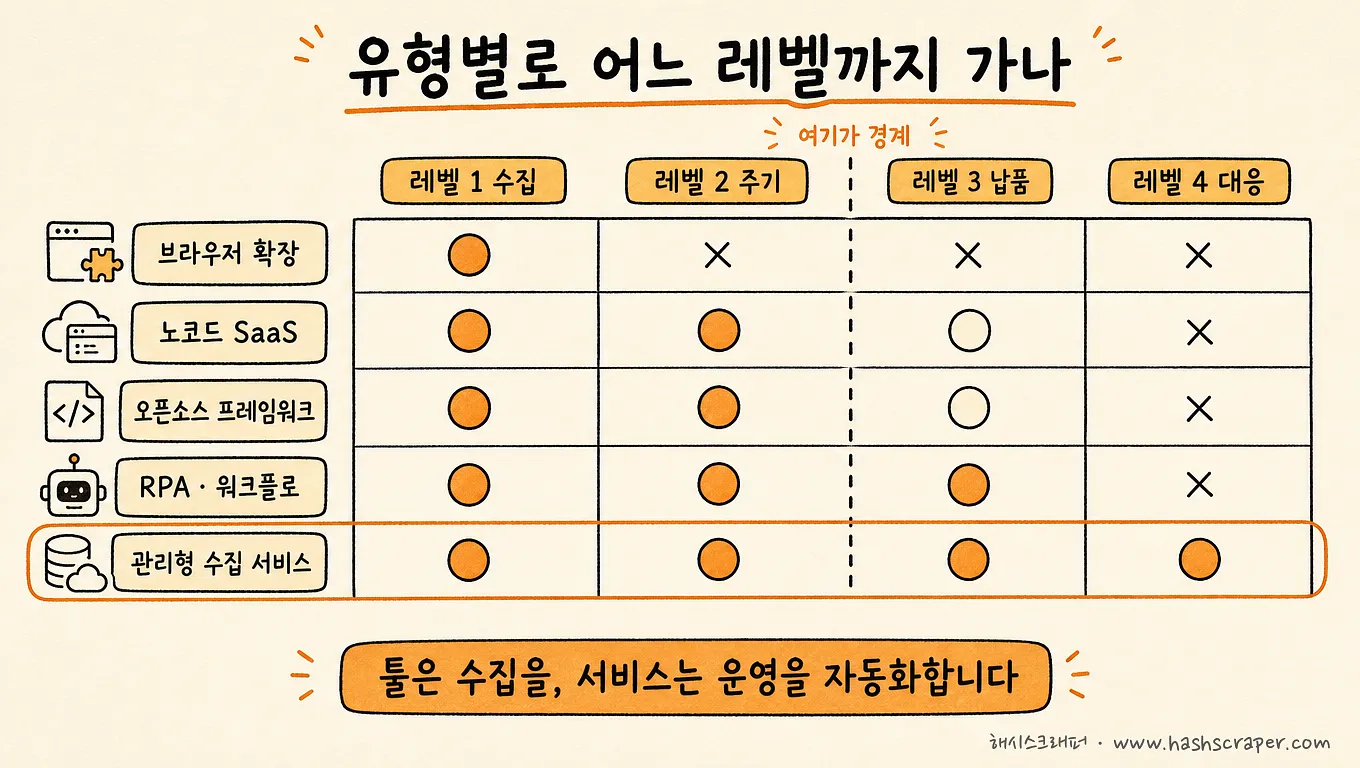
| Type | Representative Tools | Coding Required | Achievable Automation Levels | Maintenance Responsibility (Person fixing) | Suitable Scale |
|---|---|---|---|---|---|
| Browser Extension | Listly, Web Scraper | Not Required | Level 1 (Collection) | User | One-time / Small-scale |
| No-Code SaaS | Octoparse, ParseHub, Browse AI | Not Required | Level 1~2 (Collection / Periodic) | User | Small to Medium-scale repetition |
| Open-Source Framework | Scrapy, Selenium, BeautifulSoup, Playwright | Required (for developers) | Varies by design (Level 1~4) | Development Team | Proportional to team's capabilities |
| RPA·Workflow Tools | Zapier, Bardeen | Not Required | Level 2~3 (Periodic / Delivery Connection) | User | Small-scale / Business connection |
| Managed Collection Service | HashScraper | Not Required | Level 1~4 Entirely | Company (Included in subscription) | Continuous / Large-scale / Business use |
Detailed pricing and features change frequently, so it is recommended to refer to the official website of each service for final confirmation.
The two columns to focus on in the table are Achievable Automation Levels and Maintenance Responsibility. The rest are the results of those two columns.
Level 4 Automation: From Collection to Response
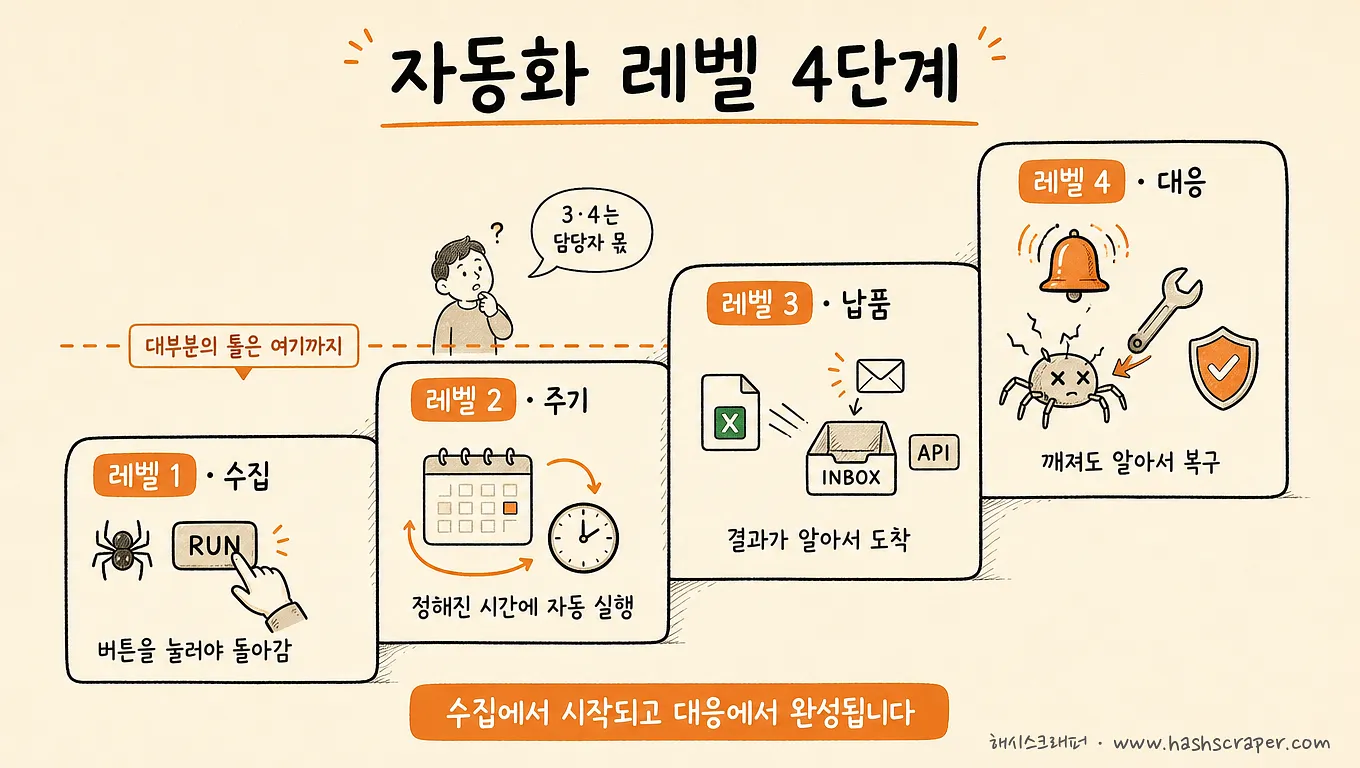
Just like autonomous driving has levels.
Level 2 is about maintaining the lane and keeping the distance from the front car. Still, the driver cannot take their hands off the wheel.
Data collection automation is the same. Most tools recommended on lists fall under Level 2 — automation that needs human supervision while it's running.
| Level | What is Automated | Tasks Still Done by Humans | Types Handling This Level |
|---|---|---|---|
| Level 1. Collection | Information on the screen is extracted into tabular data | Pressing the execute button, organizing files | All 5 types |
| Level 2. Periodic | Automatically runs at set times | Checking results, moving files, monitoring for breakdowns | No-Code SaaS, Open-Source, RPA, Managed |
| Level 3. Delivery | Results automatically arrive in Excel, Email, API, DB | Checking for anomalies | RPA (Connection), Open-Source (Implementation), Managed |
| Level 4. Response | Detects and recovers from site redesigns, blocks, or missing collections | None (Handled by company / development team) | Open-Source (If owned by development team), Managed |
One thing needs to be pointed out here.
Automation levels are more like multiplication than addition. Even if the previous three levels are perfect, if the fourth level involves a human, the human will ultimately have to keep waiting. If you've developed a habit of checking if data arrived every morning, that's not automation, it's adding a monitoring task.
The way to check your level is simple.
Check if there were any empty days in last month's collected data, and if there were, see who noticed it and when.
With over 500 companies supported for collection, the pattern of collapse is consistent. You chose the tool well, but if the site gets redesigned three months later and there's no one to fix it, the collection quietly stops.
Tools automate collection, services automate operations.
Managed services handle this Level 4 instead of the responsible person. If the collection stops, the monitoring and recovery by the service provider is faster than the responsible person.
There are cases where total costs were reduced by 68% annually compared to individual outsourcing methods with HashScraper's structure.
What Level is Our Company at Now? Self-diagnosis in 5 Questions

Check it out. These five lines are faster than the top 10 recommendation lists.
- [ ] Does it run without pressing a button? → If not, Level 1
- [ ] Does the collection result arrive automatically in Excel, Email, API? → If not, Level 2
- [ ] Does the system know first when the collection stops? → If not, Level 3
- [ ] Were there any empty days in last month's data, and if so, how many days did it take for someone to notice?
- [ ] If the site gets redesigned and the collection breaks, is there someone in-house to fix it?
The first three questions reveal your current level.
The last two questions guide you on the direction. If you noticed the empty days late and there's no one to fix it, Level 4 is not about changing the tool but changing the type to move up.
4 Steps to Level Up Automation
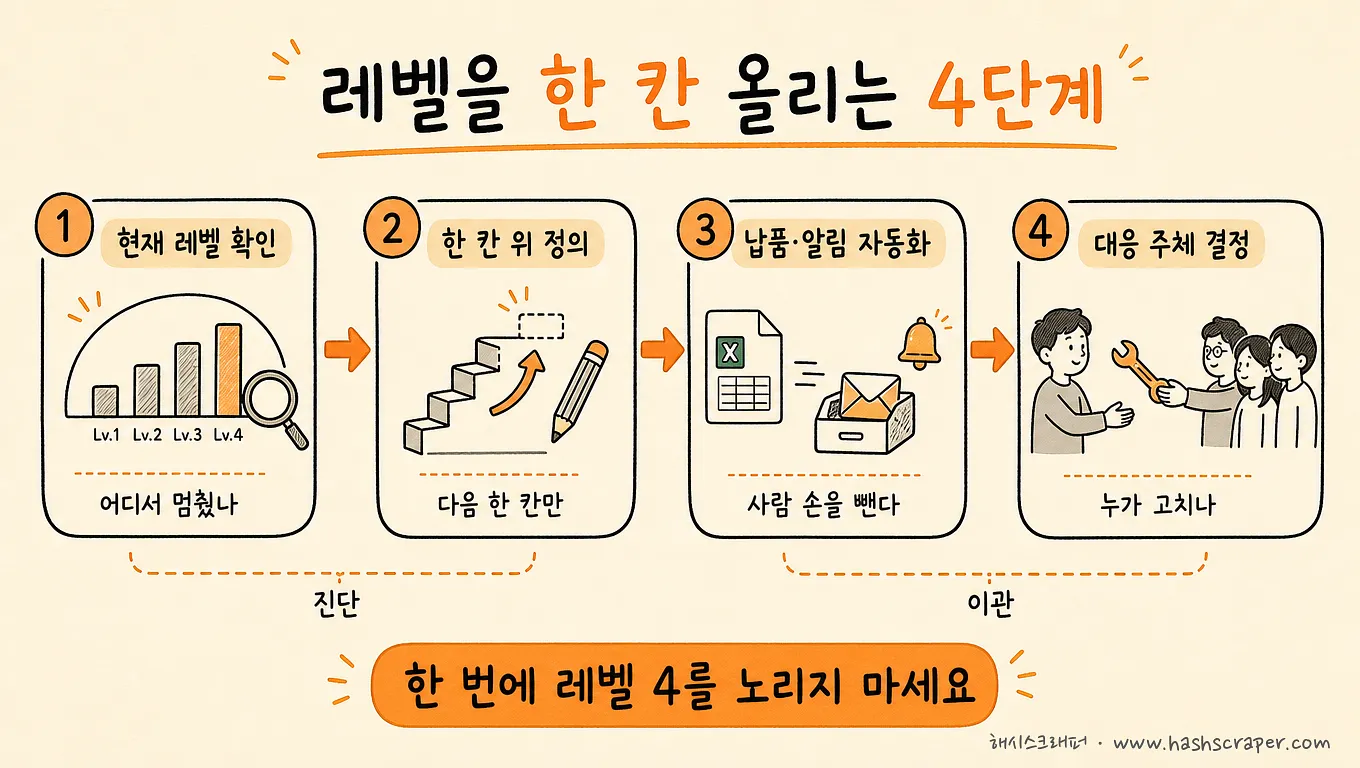
Step 1. Write down your current level as a number. It's the same as the self-diagnosis result. Most teams are at Level 1 or 2. There's no reason to blame yourself — because the tools are only sold up to there.
Step 2. Define the level required by the task. If it's data you use occasionally, Level 1 is enough. If it goes into a report every week, at least Level 3 is required. If data gaps affect pricing or revenue immediately, Level 4 is a requirement.
Step 3. Keep only the types that reach that level as candidates. When you look at the corresponding level cell in the comparison table, the types are reduced to one or two. You can choose the tool next.
Step 4. Run them for a month and keep the one that doesn't stop. Try running the remaining two or three candidates for free or with a demo. The validation axis is not "does it run well." It's "who noticed first when it stopped."
If you're curious about the overall landscape of data collection methods, you can also check out Comparing Four Methods of Web Data Extraction.
Today's task is not installing a tool. It's about writing down a number to indicate what level our automation is at.
Frequently Asked Questions
Q. What is the best web data collection automation tool you recommend?
A. Answering by type is more accurate. Screen scraping is done by browser extensions (Listly, Web Scraper), direct operation by no-code SaaS (Octoparse, ParseHub, Browse AI), self-built by developers using open-source frameworks (Scrapy, Selenium, BeautifulSoup), post-collection connection by RPA·workflow tools (Zapier, Bardeen), and continuous collection by managed services (like HashScraper). The narrowing criteria are "how many levels of automation are needed."
Q. Open-source is free, isn't that the best option?
A. Only the license is free. The actual cost is the time of the developer to create crawlers and fix them every time the site changes. If you have a development team and collection is a core competency, it's a good choice and the only type that can design up to Level 4. Otherwise, total costs often end up higher.
Q. How are RPA and scraping tools different?
A. Scraping tools automate the task of extracting data from the web (collection), while RPA·workflow tools automate the task of moving extracted data and connecting it to other business tools (workflow). In terms of levels, scraping tools are strong in Levels 1~2, while RPA is strong in Levels 2~3. They are more like complements than substitutes.
Q. Who fixes it if automation stops?
A. This question is practically the criterion for choosing a type. Browser extensions·no-code SaaS·RPA are fixed by users, open-source by the development team, and managed services are fixed by the service provider. HashScraper handles site changes·blocks response included in the subscription.
Q. Isn't Octoparse or Selenium always on the recommendation list enough?
A. Both are good tools, but they belong to different types. Octoparse is a no-code SaaS for direct operation (Levels 1~2), while Selenium is material for developers to write code. If you need delivery and response (Levels 3~4), you need to choose the type again, not the tool.
Conclusion
Choosing an automation tool is not about "finding the best tool." It's about deciding how many levels of automation you want.
- If you only need Level 1 (collection) → Browser Extension
- If you operate up to Level 2 (periodic) yourself → No-Code SaaS, or if you have a development team → Open-Source Framework
- If connection at Level 3 (delivery) is crucial → RPA·Workflow Tools in parallel
- If you want to delegate up to Level 4 (response) → Managed Collection Service
Once you've decided on the level


