

"I want to receive a summary every morning at 8 AM containing only competitors' new products added yesterday and products that went out of stock."
That is the entire requirement in one sentence. But when you request a quote, the conversation keeps drifting toward, "Can you collect data from that site?"
Data collection is not the difficult part of this request.
The competitor product list is already visible on the screen. You can see it when you open the page.
There is only one thing you cannot see: which products were not there yesterday.
Prices are written on today's screen. New products and out-of-stock products only exist if yesterday's list exists.
3-Line Summary (TL;DR)
- New products and out-of-stock items are not values read from a page; they are the difference (diff) between yesterday's list and today's list. That is why the first thing to design is not the crawler, but a baseline snapshot recorded every day using the same criteria.
- The second challenge is that out-of-stock labels are not standardized. Out of stock, temporarily out of stock, restock notifications, and option-level out-of-stock statuses are expressed differently by each site. Unless you define what counts as out of stock, you will accumulate numbers measured with a different ruler every day.
- "Every morning" is not the collection time; it is the delivery time. If you want it delivered by 8 AM, you need to work backward to account for validation and retry time. If you send everything without thresholds, no one will open it by the third week.
Table of Contents
- What New Product Monitoring and Out-of-Stock Monitoring Are
- If You Discard Yesterday's List, You Will Never See Today's New Products
- Out of Stock Is Expressed Differently by Every Site
- Every Morning Means Delivery Time, Not Collection Time
- No One Looks at a Report with 200 Items a Day After the Third Week
- Comparison by Approach: Manual Checking vs No-Code Tools vs Managed Services
- 5 Self-Diagnostic Questions Before You Start
- 5 Implementation Steps
- Frequently Asked Questions
- Conclusion
What New Product Monitoring and Out-of-Stock Monitoring Are
New product monitoring is the activity of collecting product lists from competitors and sales channels at regular intervals, then automatically identifying whether products that did not exist at the baseline point have newly appeared.
Out-of-stock monitoring is the activity of periodically collecting the availability status of the same products and detecting the moment a status changes, such as available for sale → out of stock or out of stock → restocked.
Both definitions contain the same words: did not exist, and changed.
This is where they diverge from price monitoring.
For prices, one page today gives you the answer. The number is written on the screen.
For new products and out-of-stock items, today's page alone does not provide an answer. You need yesterday's data to compare against.
That is why this work is closer to comparison than collection. The design criteria for price-related monitoring are covered separately in How to Choose a Data Collection Service for E-Commerce Price Comparison and Monitoring.
If You Discard Yesterday's List, You Will Never See Today's New Products
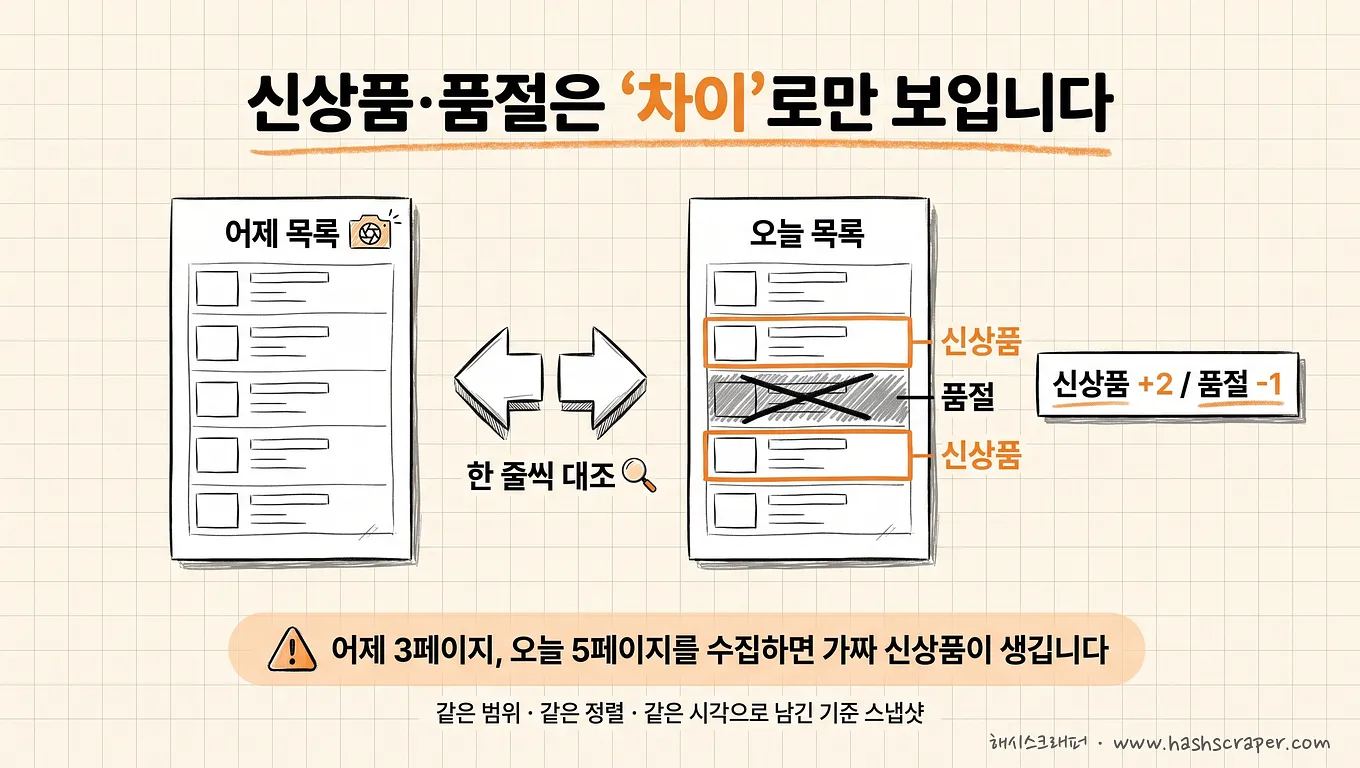
A baseline snapshot is data that stores the entire product list and its statuses at a specific point in time, serving as the reference for comparison with the next run.
For the comparison to work, three things need to remain fixed.
- Identifier — What counts as the same product (product ID, URL, product name + option)
- Scope — Is the collection scope the same yesterday and today?
- Time — Is the snapshot taken at the same time every day?
Most problems occur with the second one.
If you collect 3 list pages yesterday and 5 pages today, the report will show dozens of new products. Even though none of them are actually new.
An even trickier issue remains. A product you see for the first time is not necessarily a new product.
There are at least four reasons a product may appear in a list for the first time.
- Genuinely new product — A newly launched product
- Renewal re-registration — A product page newly created because the capacity or packaging changed
- New option added — An existing product that appears like a separate product after colors or sizes are added
- Restock return — A product that was removed from the list because it was out of stock and later returned
The fourth is an especially quiet false positive. Many sites remove out-of-stock products from lists entirely, so restocked products are detected as new products every time.
The distinction is made not through technology but through rules. Was a new product ID issued? Should products with name similarity above a threshold be excluded as renewal candidates? Should products that appeared in the list within the last 30 days be treated as reappearances?
From supporting data collection for more than 500 companies, the first failure in new-product reports was usually not blocking. It was the absence of yesterday's saved list.
Who writes these rules, and who maintains them when a site is redesigned? This project is essentially about that one question.
Out of Stock Is Expressed Differently by Every Site
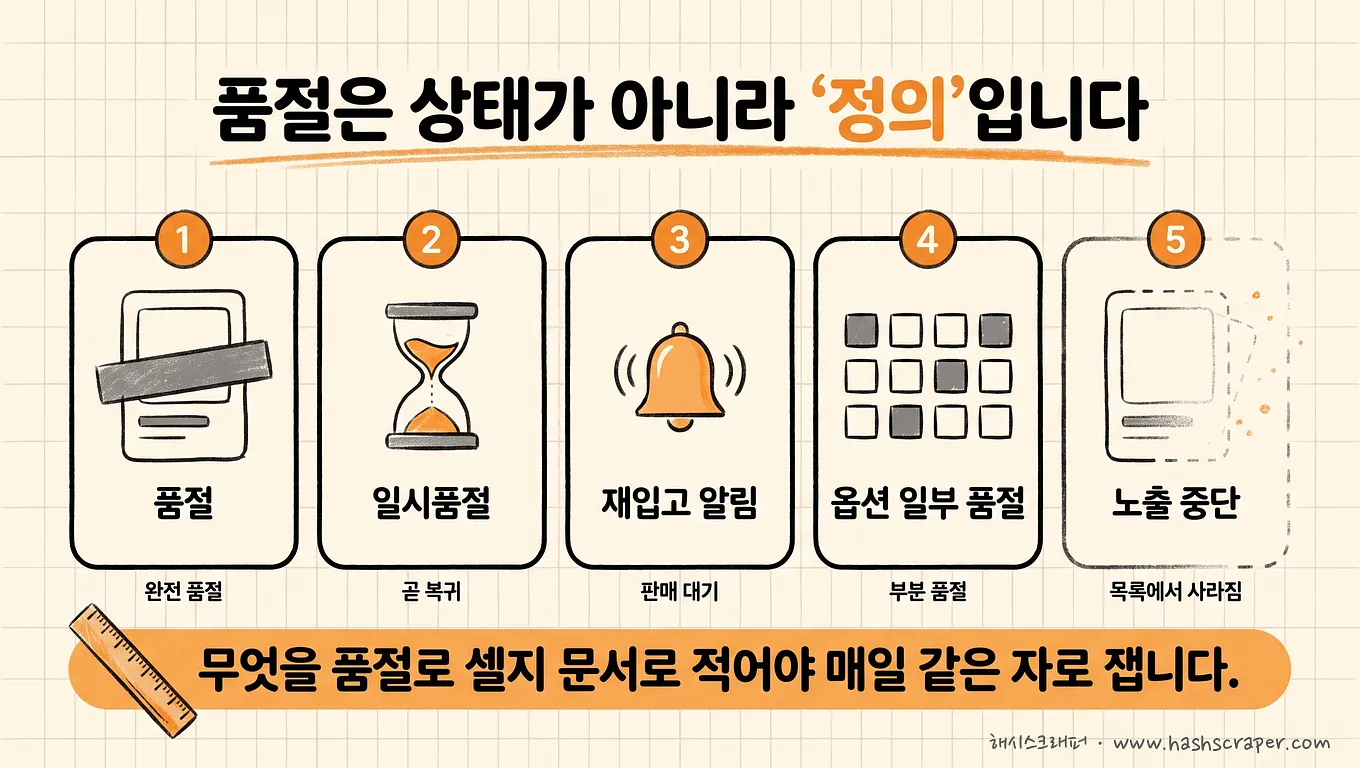
Out-of-stock status is not a single value either. Different sites display the same "you cannot buy it right now" situation differently.
- Out of stock / temporarily out of stock / restock expected / sales discontinued
- A state where the purchase button disappears and only "Apply for Restock Notification" remains
- The button remains, but all options are unavailable when opened
- Only 3 out of 12 options are out of stock (the product itself is still for sale)
- A state where the product disappears entirely from search results
One practical decision is needed here.
"If 3 out of 12 options are out of stock, is that product out of stock or not?"
If the team cannot answer this question in one sentence, the daily out-of-stock count is a number measured by different criteria every day.
A reasonable approach is to record it in two layers.
- Product level — Can it be purchased now? (available / unavailable)
- Option level — How many of the total options are unavailable?
Also retain the original wording displayed on the screen. This allows you to reclassify historical data retroactively even if the site changes its wording.
The final item—disappearing from search results—must be handled separately. Is it out of stock, discontinued, or has our collection scope changed? All three look identical on the screen.
Out of stock is not a status; it is a definition. Unless you document the definition, you will accumulate numbers measured with a different ruler every day.
Every Morning Means Delivery Time, Not Collection Time
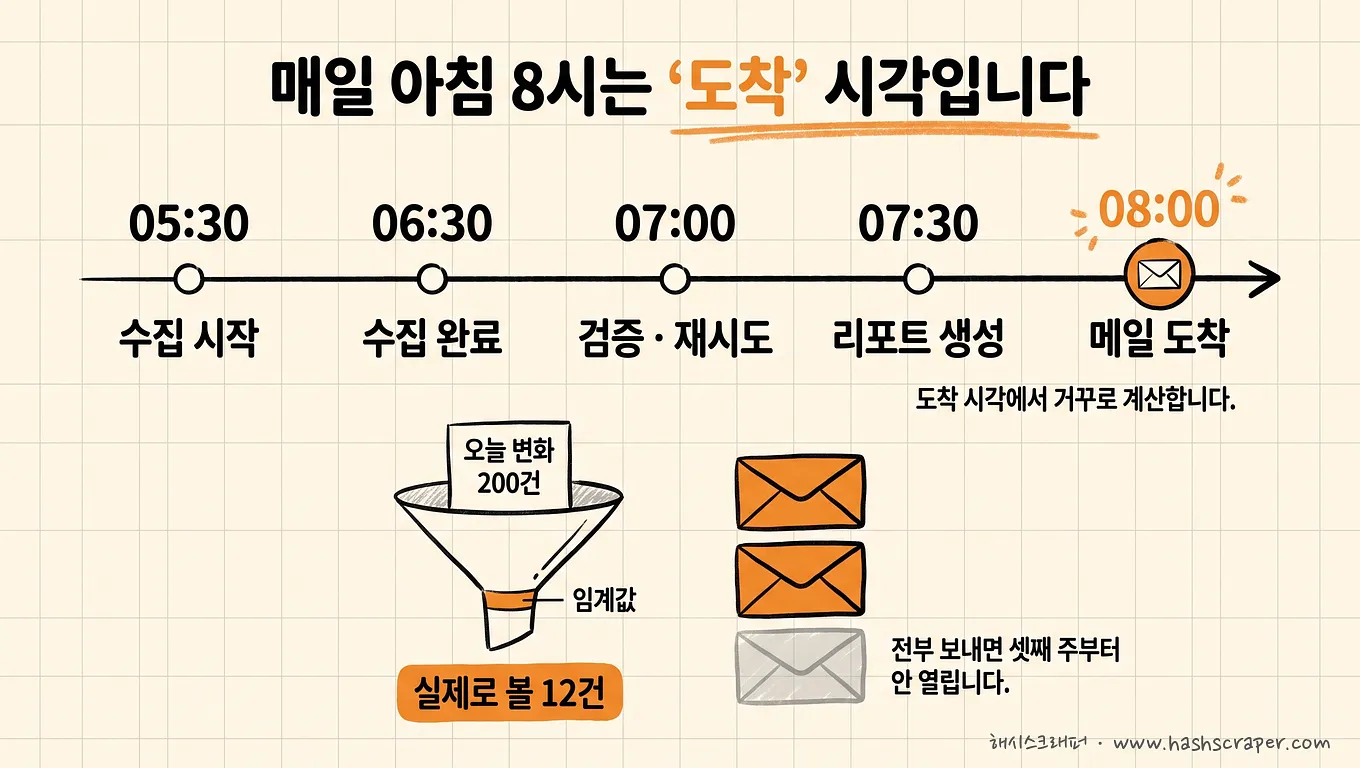
The requirement is "an email at 8 AM," but design usually stops at "run the crawler at dawn." The order needs to be reversed.
Start from the delivery time and work backward. It varies depending on target scale and site difficulty, but the framework looks like this.
| Time | Activity |
|---|---|
| 08:00 | Report arrives in the owner's email inbox or Slack (this is the requirement) |
| 07:40 | Generate and send the report |
| 07:00 | Data integrity validation + comparison with yesterday's snapshot |
| 05:30 | Start collection — including room to retry failed items |
| Previous day 05:30 | Snapshot that serves as the comparison baseline |
There are two slots that are often left empty: validation and retries.
If you build a schedule assuming collection will succeed in one attempt, the report will be empty or late on the days it fails. Pipelines with no buffer are silent on failure days.
Keeping the snapshot time the same every day matters for the same reason. If yesterday's snapshot was taken at 3 AM and today's at 9 AM, products added in between may be split across two days or missed entirely.
The difficult part is not "morning," but "every day." Building it once takes a day; making it arrive every day at the same time using the same criteria is operations.
No One Looks at a Report with 200 Items a Day After the Third Week
If you monitor entire categories across three competitors, there can be hundreds of new-product and out-of-stock changes every day.
In the first week, people read everything. In the second week, they skim it. By the third week, they do not open it.
That is why thresholds make up half of report design.
- Scope — Start not with all categories, but with the categories, price ranges, and brands your team actually responds to
- Importance — Pin new products in core categories and out-of-stock products that compete with your bestsellers to the top
- Grouping — Send one daily summary instead of individual notifications. Top 10 items + full list as an attachment
- Recipients — New products go to product planning; out-of-stock items go to sales and MD teams. Make sure no one receives notifications meant for someone else
The purpose of a report is not to show everything. It is to leave only what needs to be seen today.
A loop design connecting detection to response is covered in Monitoring Is Not Collection but Notification — Building a Response Loop.
Comparison by Approach: Manual Checking vs No-Code Tools vs Managed Services
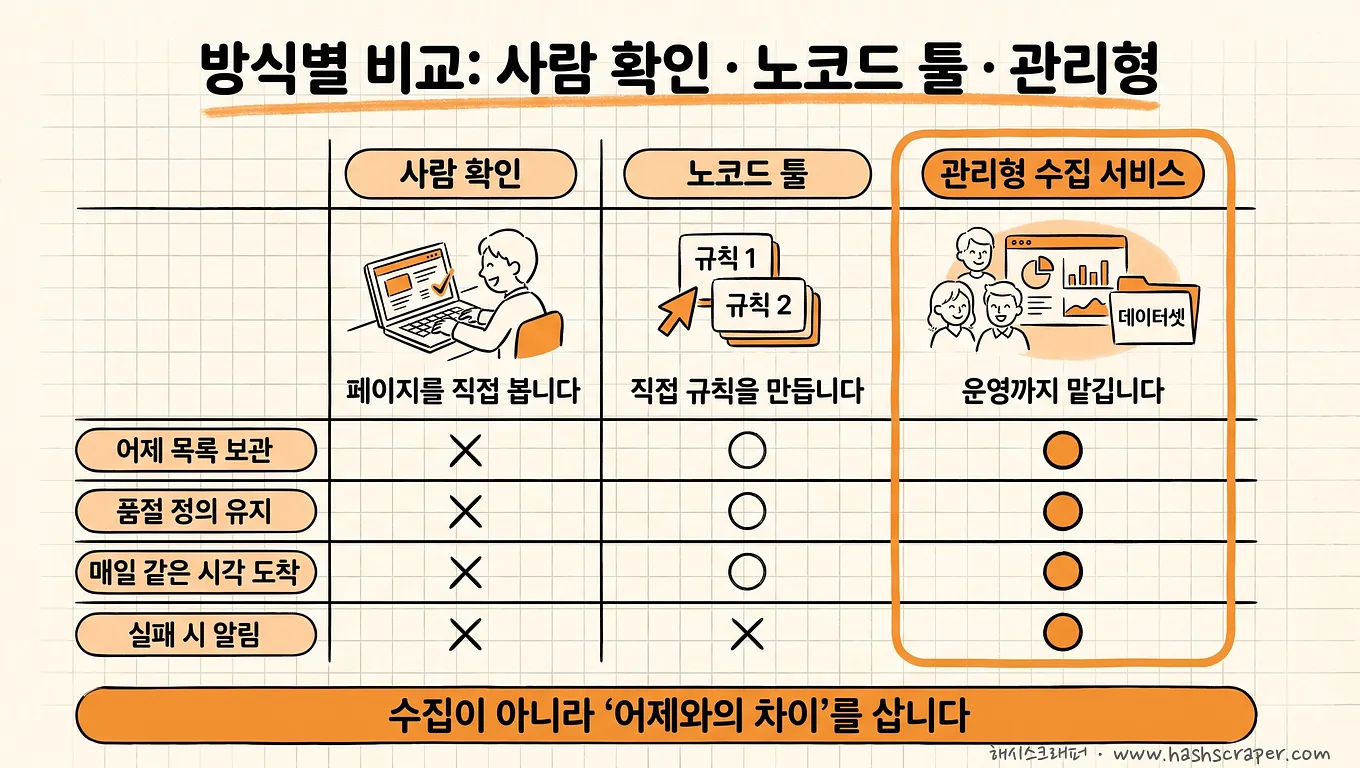
A managed data collection service is a subscription-based service in which a provider operates crawler development, blocking countermeasures, repairs after site changes, anomaly detection, and on-time delivery on behalf of the company, while the company receives only the resulting reports.
When the three approaches are placed on the same axes, the differences look like this.
| Category | Manual Daily Checking | No-Code Tool Scheduler | Managed Data Collection Service |
|---|---|---|---|
| Representative tools | Browser bookmarks | Octoparse, Thunderbit, etc. | Hashscraper, etc. |
| New product identification (difference from yesterday) | Memory and visual judgment | Results are available for each run — comparison is generally the user's responsibility | Snapshot storage + identification rules designed as requirements |
| Out-of-stock label handling | A person reviews and decides | Collects the designated elements as-is | Builds and maintains a site-specific label dictionary |
| On-time daily delivery | Depends on the owner's start time | Scheduled cloud execution (according to official sites) | Designed and operated by working backward from the delivery time |
| Anomaly detection (empty values, sudden count changes) | When something feels off | User checks directly | Includes count trend and required-value validation (99.7% accuracy) |
| When a site is redesigned | Requires more manual work | User repairs the rules | Provider detects and repairs it (included in subscription) |
| Best fit | 10 or fewer targets, once per week | Few targets, stable structure, capable of direct operation | Daily morning reports are tied to actual work |
The two rows to focus on in the table are the ones above: new-product identification and out-of-stock label handling. Everything else follows from those decisions.
It is not because no-code tools are inadequate. Both rows are issues of definition, not tool functionality. Octoparse and Thunderbit will reliably run scheduled executions once rules are configured (according to their official sites). However, the judgment of "compare with yesterday and retain only newly added rows" still remains the user's responsibility.
If you have a development team, there is a fourth option. You can purchase the collection layer through developer-focused scraping APIs such as Zyte and Firecrawl, then build snapshot storage, comparison, and report generation yourself (according to their official sites). This provides the greatest flexibility.
However, the three elements covered in this article—snapshot management, an out-of-stock label dictionary, and on-time delivery—are not defined by any API. They remain entirely with the team building the solution.
Hashscraper provides this managed approach based on experience collecting data from more than 5,000 domestic sites and proxies across 195 countries, and is used by more than 500 companies.
5 Self-Diagnostic Questions Before You Start
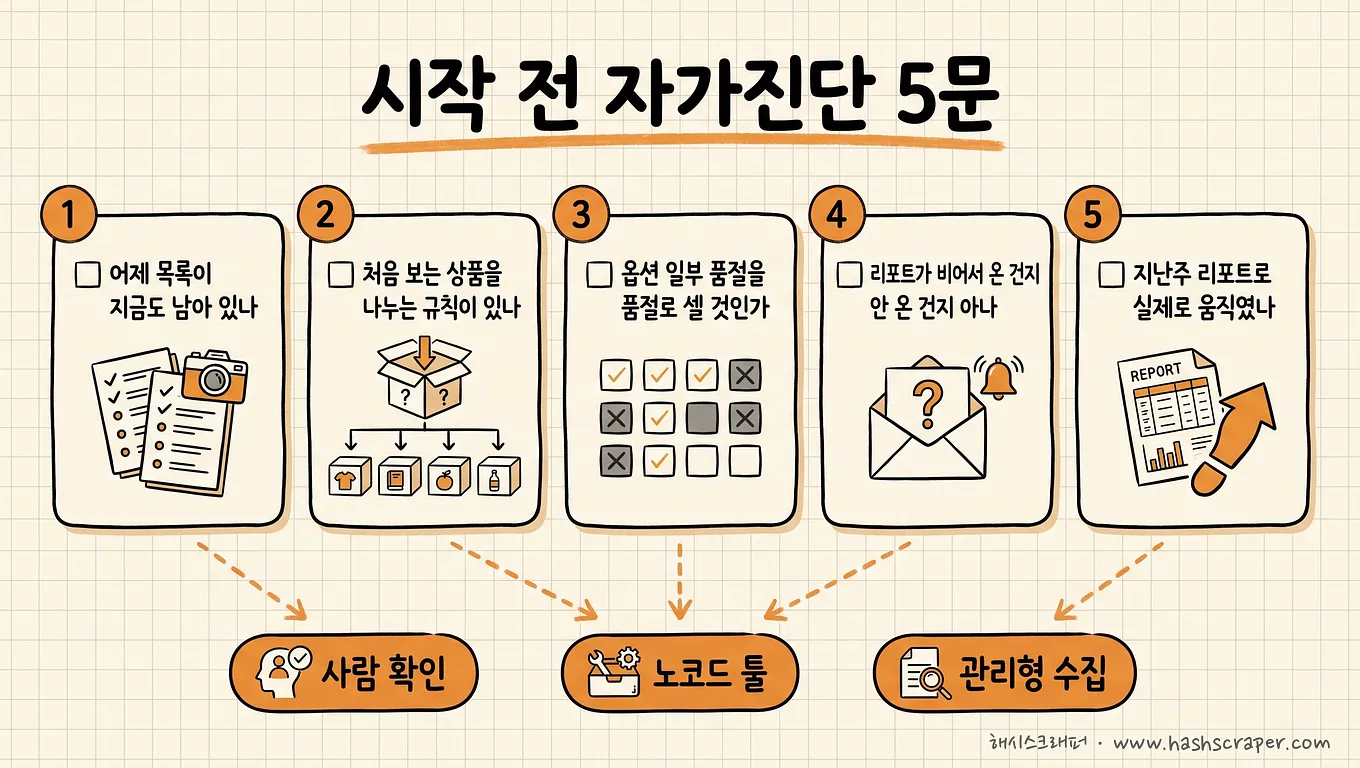
Check these. These five lines are faster than reviewing three quotes.
- [ ] Does the product list collected yesterday still exist now — in a format that can be compared line by line with today's list?
- [ ] Is there a documented rule that separates a first-seen product into a new product, renewal, added option, or restock?
- [ ] Can the team answer in one sentence whether a product with only some options out of stock should be counted as out of stock?
- [ ] On a day when collection fails, can the recipient distinguish whether the report arrived empty or did not arrive at all?
- [ ] Did reviewing last week's report lead to any actual action?
If the answer to question 1 is "no," you are not yet at the stage of comparing tools. Start by saving the list from today.
If the answer to question 5 is "no," the issue is not collection but thresholds. Narrowing the scope will produce results much faster.
5 Implementation Steps
Step 1. Narrow the monitoring targets — Start not with "all competitors," but with "competitors' products in categories we respond to." The broader the target scope, the broader the false positives.
Step 2. Write the identification rules and out-of-stock definition on one page — What is the identifier? How will you distinguish renewals from new products? How will you count out-of-stock options? This one page is the requirements definition document.
Step 3. Build the schedule by working backward from the delivery time — Arrange collection, retries, validation, and delivery in reverse order. The key is not leaving validation and retry slots empty.
Step 4. Decide the delivery format and thresholds — Send it where the owner is already working: Excel, email, Slack, or API. For criteria by format, see Data Received in Excel vs Data Viewed on a Dashboard.
Step 5. Run a 2-week pilot to catch false positives, then expand — During the first two weeks, manually compare the new products shown in the report. This is when every false positive becomes visible, such as counting renewals or restocks as new products.
What you need to do today is not select a vendor. It is Step 2—write one sentence defining what "new product" and "out of stock" mean for your team.
Frequently Asked Questions
Q. I want to automatically receive competitor new-product and out-of-stock data every morning. How should I do it?
A. There are three steps. ① Narrow the target list (which categories on which sites), ② define the identification rules (what counts as new and what counts as out of stock), and ③ work backward from the delivery time to create a collection, validation, and delivery schedule. Then choose an approach. If there are only a few targets and someone in-house can fix the rules when they break, you can start with scheduled runs from no-code tools such as Octoparse or Thunderbit (according to their official sites). If the number of targets grows or actual work depends on the daily morning report, a managed data collection service is more practical. Hashscraper designs and operates the requirements through snapshot storage, identification rules, and on-time delivery.
Q. How do you distinguish a new product from a renewal?
A. It cannot be separated automatically with 100% accuracy. Narrow it down through rules—whether a new product ID was created, whether product name similarity exceeds a threshold, and whether it appeared in the list within the last N days. In practice, it is stable to combine these three signals into "new product / renewal candidate / reappearance," then have a person review only the candidate group.
Q. Each site uses different out-of-stock labels. Can they be standardized?
A. Create a site-specific label dictionary and normalize it into a single status value. It is important to retain the original wording displayed on the screen at the same time. This lets you reclassify historical data even if the site changes its wording.
Q. Can I receive it through Slack or an API instead of Excel?
A. Yes. Based on Hashscraper, it supports Excel files, automated email delivery, API integration, and direct database loading. There is one principle—send it where the owner is already working. A structure where you need to go look for information and one where the information arrives have different response speeds.
Q. How often should out-of-stock data be collected?
A. Match it to your response cycle. If decisions are made in a daily morning meeting, once per day is sufficient. If inventory depletion can be decided within a day for a product category, design for a shorter cycle, but reducing the interval also increases blocking risk and costs. The standard is not technical limits but response speed.
Conclusion
The design for a "daily morning new-product and out-of-stock report" can be reduced to this.
- Keep yesterday's list — Without a baseline snapshot, neither new products nor out-of-stock items can be calculated
- Define what counts as a new product and out of stock — Rules that distinguish renewals, added options, and restocks
- Work backward from the delivery time — Do not leave validation and retry slots empty
- Leave only what needs to be reviewed today — A 200-item report is the same as a zero-item report
Prices are read; new products and out-of-stock items are counted.
Counting requires a ruler. The same ruler as yesterday.
What you need is not today's product list. It is the difference between yesterday and today.
Collection that does not save yesterday will miss today's new products forever.
Get Started Right Away
Tell us the competitors and categories you want to monitor, along with your desired delivery time, and we will provide a free assessment of collection feasibility and how to define new-product and out-of-stock identification rules. New sign-ups receive 50,000 credits so you can verify result quality first.

.jpg)

