

0. Overview
These days, thanks to ChatGPT, the world has become much easier to develop.
Can we easily create a web scraping bot with ChatGPT as well?
Let's start developing a Coupang web scraping bot (with ChatGPT).
1. Writing Prompts
1.1. Objective
We want to extract basic information about each product from the list of products displayed in the search results.
Product name
Regular price
Sale price
Star rating
Number of reviews
Card discount information
Savings information
Shipping information
1.2. Finding the Product List HTML
Let's find the HTML element containing the product list.
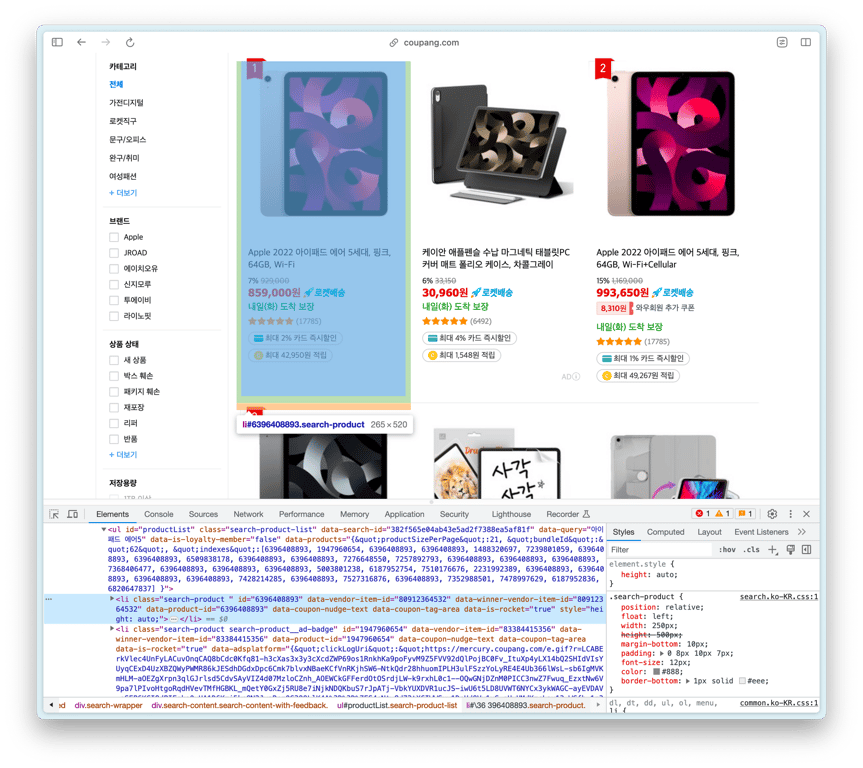
The ul with the id productList is the product list, and each li inside it is a product element.
Shall we copy the above ul HTML and ask ChatGPT?
1.3. Reducing HTML Size

Due to token limits, ChatGPT cannot handle overly large HTML like the ul above.
We need to reduce the HTML size, so let's copy the first li HTML of the ul and ask again.
1.4. Considerations for Prompts
Before writing the prompt, let's summarize what needs to be considered.
1⃣ Iterate over all **li** in the product list
Collect all products inside //ul[@id="productList"].
2⃣ Skip Advertised Products
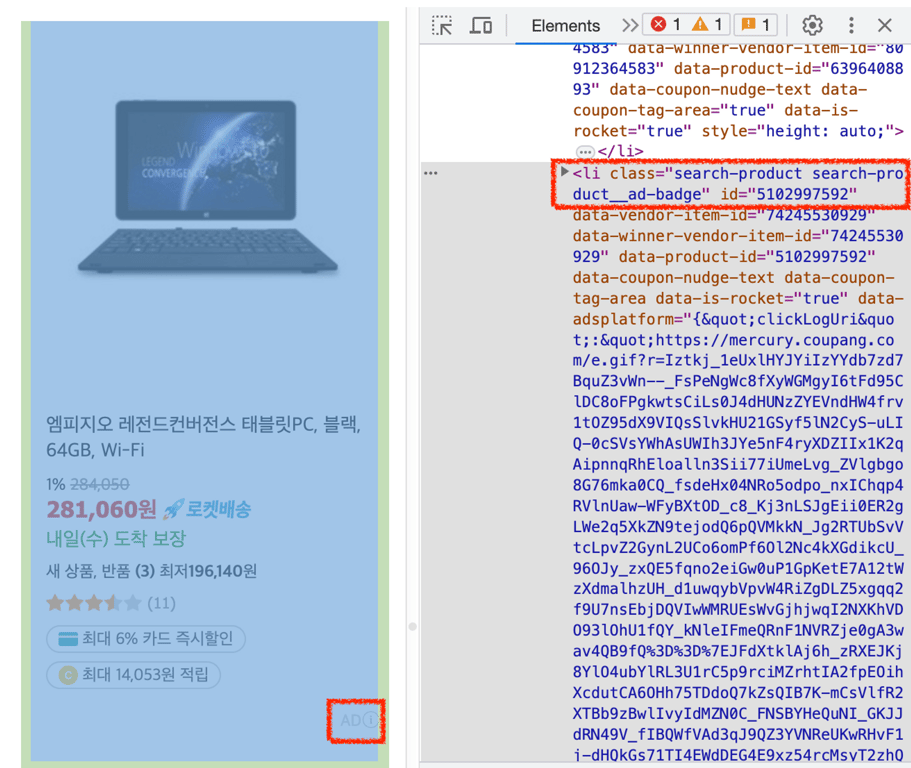
If a product has a class containing search-product__ad-badge, it is an advertised product and should not be collected.
1.5. Writing Prompts for ChatGPT
I used GPT-4 and input the prompt as follows.
<<li의 HTML>>

상품 정보를 담고 있는 위의 HTML에서 상품 이름, 가격, 정가, 별점, 리뷰 개수, 카드 할인, 적립 정보, 배송 정보를 가져오는 웹 크롤러를 셀레니움을 사용하여 만들어 줘.

이 li 요소는 "//ul[@id='productList']" 안에 있으므로, 상품 리스트를 가져와 그 안의 li 태그에 대해 수집 작업을 반복하도록 코드를 생성해 줘.

class에 search-product__ad-badge가 포함되어 있는 경우 광고 상품이므로 해당 상품은 스킵해.

수집 내용을 콘솔에 출력할 때 각 상품마다 서로 구별될 수 있도록 구분선을 추가해 줘.
1.6. ChatGPT Coding Output
## import 및 크롬 드라이버 설정 생략 ##

# 웹페이지 열기
driver.get('<https://www.coupang.com/np/search?component=&q=%EC%95%84%EC%9D%B4%ED%8C%A8%EB%93%9C+%EC%97%90%EC%96%B4+5&channel=auto>')

# 상품 리스트 가져오기
product_list = driver.find_element(By.XPATH, "//ul[@id='productList']")

# BeautifulSoup으로 파싱
soup = BeautifulSoup(product_list.get_attribute('outerHTML'), 'html.parser')

# 광고 상품 제외하고 각 상품 정보 가져오기
for product in soup.find_all('li', class_='search-product'):
    # 광고 상품인 경우 스킵
    if product.find(class_='search-product__ad-badge'):
        continue

    product_name = product.find("div", class_="name").text.strip()
    original_price = product.find("del", class_="base-price").text.strip()
    sale_price = product.find("strong", class_="price-value").text.strip()
    rating = product.find("em", class_="rating").text.strip()
    review_count = product.find("span", class_="rating-total-count").text.strip()
    card_discount = product.find("span", class_="ccid-txt").text.strip() if product.find("span", class_="ccid-txt") else "N/A"
    reward_info = product.find("span", class_="reward-cash-txt").text.strip() if product.find("span", class_="reward-cash-txt") else "N/A"
    delivery_info = product.find("span", class_="arrival-info").text.strip()

    # 콘솔에 출력
    print('-'*40)
    print("상품 이름:", product_name)
    print("정가:", original_price)
    print("판매 가격:", sale_price)
    print("별점:", rating)
    print("리뷰 개수:", review_count)
    print("카드 할인 정보:", card_discount)
    print("적립 정보:", reward_info)
    print("배송 정보:", delivery_info)

driver.quit()
2. Debugging
When we run the code generated by ChatGPT, it may not execute correctly.
In this case, we encountered the following error immediately:
Traceback (most recent call last):
  File "/Applications/PyCharm.app/Contents/plugins/python/helpers/pydev/pydevconsole.py", line 364, in runcode
    coro = func()
  File "<input>", line 13, in <module>
AttributeError: 'NoneType' object has no attribute 'text'
Let's now go through the debugging process.
2.1. AttributeError: 'NoneType' object has no attribute 'text'
Problem
Let's check the code for extracting the product name.
product_name = product.find("div", class_="name").text.strip()
This code finds the element with the product name and retrieves the text.
However, if it fails to find a div with class "name", product.find("div", class_="name") becomes a 'NoneType' object.
Since you can't get text from None, it raises an AttributeError.
Solution
Let's address this in different cases.
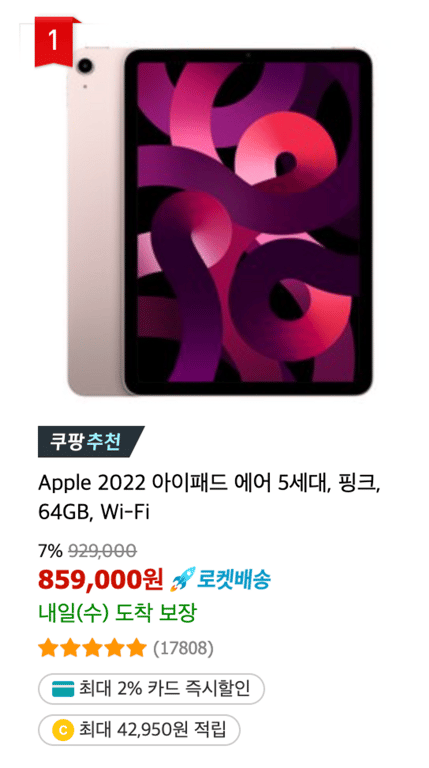

As seen in the images, the amount of information varies for each product.
Therefore, we want to categorize the information into two types.
Essential Information
Information like product name and price must not be None.
If they are None, we should raise an error.
try:
    # 요소를 찾음
    product_name = product.find("div", class_="name").text.strip()
except AttributeError:
    # 에러 발생 시 raise
    raise AttributeError("상품 이름을 가져오는 중 에러가 발생했습니다.")
Optional Information
For information like the number of reviews that can be missing, we need a different approach.
If the element containing the information is not found, we will assign None to the variable.
# 요소를 찾음
review_count_span = product.find("span", class_="rating-total-count")
# 요소가 None이라면 변수에 None 할당
review_count = review_count_span.text.strip() if review_count_span else None
This can also be written in one line:
review_count_span = product.find("span", class_="rating-total-count").text.strip() if product.find("span", class_="rating-total-count") else None
2.2. Skipping Advertised Products
The prompt contained this information.
class에 search-product__ad-badge가 포함되어 있는 경우 광고 상품이므로 해당 상품은 스킵해.
Based on this, ChatGPT generated the following code:
for product in soup.find_all('li', class_='search-product'):
    # 광고 상품인 경우 스킵
    if product.find(class_='search-product__ad-badge'):
        continue
    # ...후략
Problem
In the code above, if it finds an element with the class 'search-product__ad-badge', it skips it.
The issue is that it tries to find this class within the product internal elements.
This seems to be a problem caused by my inaccurate prompt, but let's try to fix it.
Solution
if 'search-product__ad-badge' in product['class']:
    continue
I modified the skipping condition in the loop to search for 'search-product__ad-badge' within the class of product.
2.3. Adjusting Incomplete URLs
After running the web scraping bot, we retrieved product URLs as follows.
상품 URL: /vp/products/6396408893?itemId=13659935611&vendorItemId=80912364532&pickType=COU_PICK&q=%EC%95%84%EC%9D%B4%ED%8C%A8%EB%93%9C+%EC%97%90%EC%96%B4+5&itemsCount=36&searchId=c12ac6801b8042dbbe20f91a2e875bc0&rank=1
Problem
When parsing HTML with BeautifulSoup, the URL in the href attribute may not display the complete URL.
Comparing the above URL with the actual URL, we can see that the beginning https://www.coupang.com/ is missing.
Solution
Let's add the missing part to the URL.
product_url = "https://www.coupang.com" + product.find('a', class_='search-product-link')['href']
3. Checking the Collected Results
Let's check the data collected by the modified web scraping bot.
----------------------------------------
상품 URL: <https://www.coupang.com//vp/products/6396408893?itemId=13659935634&vendorItemId=80912364549&q=%EC%95%84%EC%9D%B4%ED%8C%A8%EB%93%9C+%EC%97%90%EC%96%B4+5&itemsCount=36&searchId=e5fbb32250614118b4a65b814ec1b9ae&rank=10>
상품 이름: Apple 2022 아이패드 에어 5세대, 스타라이트, 256GB, Wi-Fi
정가: 1,169,000
판매 가격: 1,098,860
별점: 5.0
리뷰 개수: (17833)
카드 할인 정보: 최대 1% 카드 즉시할인
적립 정보: 최대 50,000원 적립
배송 정보: 내일(목)   도착 보장
----------------------------------------
상품 URL: <https://www.coupang.com//vp/products/1947960654?itemId=5913484902&vendorItemId=83384415356&sourceType=SDW_TOP_SELLING_WIDGET_V2&searchId=e5fbb32250614118b4a65b814ec1b9ae&q=아이패드> 에어 5
상품 이름: 케이안 애플펜슬 수납 마그네틱 태블릿PC 커버 매트 폴리오 케이스, 차콜그레이
정가: 33,150
판매 가격: 30,960
별점: 5.0
리뷰 개수: (6498)
카드 할인 정보: 최대 4% 카드 즉시할인
적립 정보: 최대 1,548원 적립
배송 정보: 내일(목)   도착 보장
----------------------------------------
상품 URL: <https://www.coupang.com//vp/products/5540742883?itemId=8726176862&vendorItemId=79466342181&sourceType=SDW_TOP_SELLING_WIDGET_V2&searchId=e5fbb32250614118b4a65b814ec1b9ae&q=아이패드> 에어 5
상품 이름: 신지모루 애플펜슬 수납 아이패드 클리어 케이스 + 강화유리 2P, 웜그레이
정가: 26,900
판매 가격: 25,900
별점: 5.0
리뷰 개수: (1313)
카드 할인 정보: 최대 2% 카드 즉시할인
적립 정보: 최대 1,295원 적립
배송 정보: 내일(목)   도착 보장
Although it's a simple web scraping bot that collects products displayed in search results, we can see that it gathers quite a lot of information!
4. Conclusion
So far, we have examined the process of web scraping Coupang's search results using ChatGPT. While ChatGPT is a very useful tool, it required some debugging and modifications. Nevertheless, we were able to obtain results that are quite usable.
However, to efficiently collect Coupang search results, various considerations are necessary. Coupang quickly detects and blocks bots, so effective ways to bypass this are needed. Additionally, collecting information that appears differently based on login status requires additional work. These constraints can complicate web scraping tasks and pose challenges to accurate and fast information retrieval.
To effectively address these issues, professional tools and services are required. HashScraper provides a specialized web scraping service that can solve these complex problems. With HashScraper, you can collect various information from Coupang smoothly and quickly.
In this post, we explored how to develop a web crawler using ChatGPT. While there are various tools and methods available, for the most efficient and accurate information retrieval, we recommend utilizing professional services.
Thank you.
Also, check out:
Automate Data Collection Now
Start web scraping from 5,000+ websites in 5 minutes without coding


